Robopack App Packaging for Microsoft Intune

System Center Dudes is an authorized reseller of Robopack. When you purchase or renew your licenses through us, you’ll benefit from:

  • Exclusive partner discounts — save up to 40% off the retail price
  • Expert assistance — get professional support for setup and daily use
  • Service bundle savings — Receive additional discounts on our consulting services
  • Fast and efficient license management for both new purchases and renewals

Contact us to:

How System Center Dudes Can Help You Evaluate Robopack

Since System Center Dudes is an official Robopack partner, here’s how we can work with you to evaluate the platform.

You don’t need to make any commitment up front — we can guide you through the entire discovery and testing process. If you want to:

Trial Setup
We’ll help you set up a full Robopack trial in your production tenant or test tenant, connect it to Microsoft Intune, and guide you through migrating a pilot group of applications. This hands-on approach lets you see real results quickly and understand exactly how Robopack performs in your environment.
Pilot packaging & Patch Flow
We’ll help you select 5–10 key applications, convert them using Robopack’s automated packaging engine, configure wave-based deployments, and closely monitor deployment results to validate performance and reliability in your environment.
Metrics & Assessment
Measure the time savings, deployment success rates, and improvements in patch compliance to clearly demonstrate the value Robopack brings to your environment.

How Robopack Automates Win32 App Packaging – See it in action

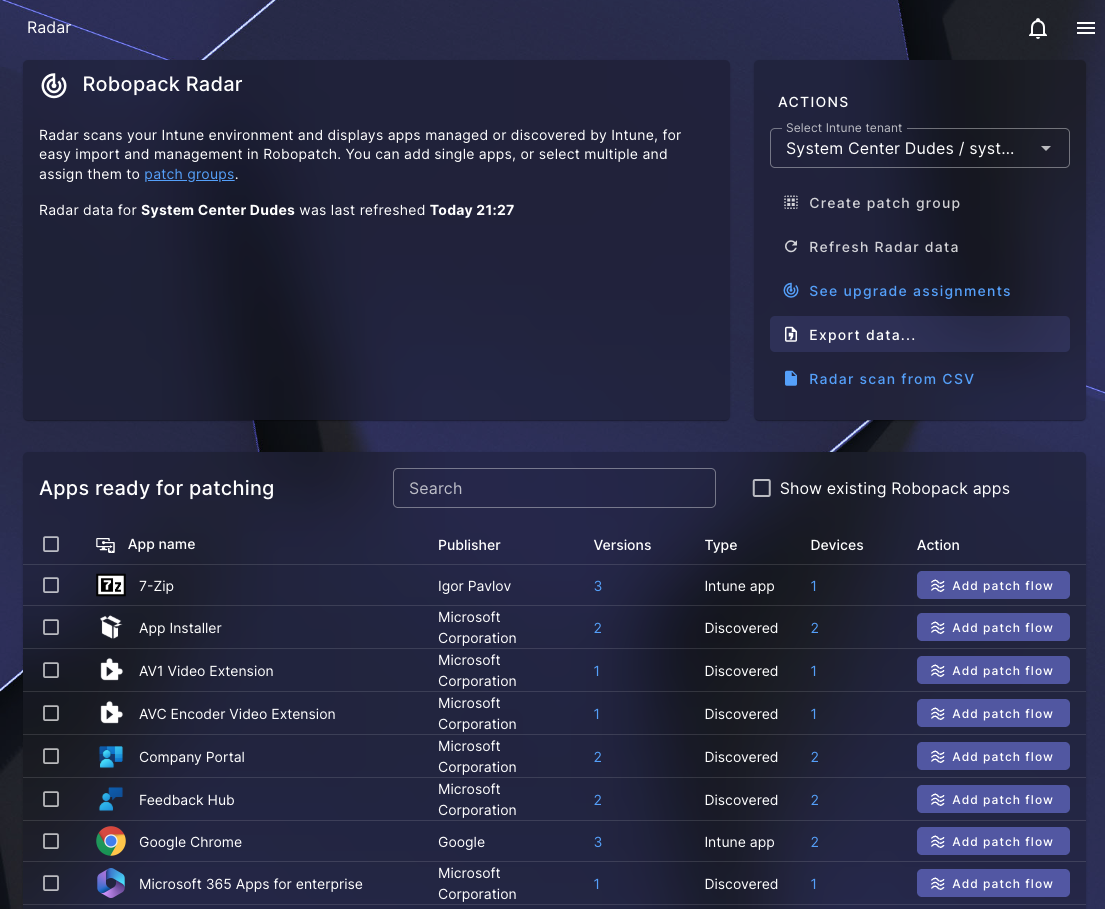
Robopack simplifies application management in Microsoft Intune by automating many of the manual steps typically required for packaging and updating applications.

  1. Connect Robopack to your Intune tenant
  2. Select an application from the catalog or upload your installer
  3. Automatically generate the Intune package and detection rules
  4. Deploy the application to devices
  5. Enable automatic updates through patch flows

This automation helps Intune administrator reduce manual packaging work and maintain applications more efficiently.

Request a Robopack Demo and Quote

If you’re ready to move forward, we can set up a no-obligation Robopack trial, guide you through the entire setup process, and make sure you’re evaluating all the features that matter for your environment.

This field is for validation purposes and should be left unchanged.
Name(Required)
Email(Required)
Company Name
How many devices to manage?

What is Robopack for Microsoft Intune

  • Robopack is an Intune app packaging automation tool – You spend less time building and updating packages
  • Packages follow automated rules, reducing human error and ensuring that detection logic, uninstallation, and versioning are handled consistently.
  • Fewer gaps in patching, faster update cadence, more predictable rollout.
  • As device numbers and application volumes grow, manual workflows become untenable; Robopack is built to scale.
  • Designed for cloud-first, Intune-first management and no legacy baggage.
  • For organizations modernizing their endpoint strategy (Windows 11, Intune, modern app lifecycle management), Robopack offers a compelling solution.

For Intune administrators

  • Automate Win32 packaging
  • Simplify detection rules
  • Automatic app updates

For MSPs

  • Multi-tenant packaging
  • Standardized deployment
  • Patch compliance
FAQ

What is Robopack for Intune?
Robopack is a cloud platform that automates application packaging, conversion, and patch management for Microsoft Intune environments.
How much does Robopack cost?
Robopack offers graduated pricing starting at EUR 3.50 per device/year. As a reseller, we can offer a rebate up to 40% on the MSRP.
How many applications are available?
Robopack provides access to over 40,000 applications from Winget and the Microsoft Store. You can also upload custom applications.
Does Robopack support Win32 apps?
Yes, Robopack can convert installers like MSI and EXE into Intune-compatible formats such as IntuneWin or MSIX.
Is Robopack ISO 27001 certified?
Yes. Robopack holds ISO 27001 certification, ensuring that your data and operations meet international information security standards.
Can I try Robopack for free?
Yes. You can request a free trial by using the form on this page. The trial gives you full access to all features. See Setting Up Your Free Trial for a walkthrough. The default trial limit is 25 packages, but support can increase this to 250 upon request.
Does Robopack have an API?
Yes. Robopack provides a public V1 API for managing flows, deployments, and viewing Radar data. An interactive API browser is available in Settings > API Integration > API Documentation. The V1 endpoints are the only ones supported for external use — other endpoints visible in browser network requests are internal and unsupported.
Robopack vs Patch My PC: Which Intune Packaging Tool Should You Choose?
As a reseller, we work with both Robopack and Patch My PC, and we genuinely like both solutions. Each product addresses the same challenge—automating application packaging, deployment, and patching for Microsoft Intune environments—but they approach it in slightly different ways. Patch My PC is a very mature platform with a long track record in enterprise environments and strong capabilities for third-party application updates and catalogue-based deployments. Meanwhile, Robopack is a newer cloud-native solution focused on simplifying the full application lifecycle with automation features such as package conversion, deployment waves, and integrated patch management. In practice, both tools help Intune administrators save time and keep applications up to date. The best choice depends on your environment, your processes, and how much automation you want in your packaging workflow. That’s why we encourage organizations to evaluate both solutions and choose the one that best fits their needs.
Manual Packaging → Robopack Automation

In today’s endpoint-management world, keeping your applications packaged, deployed and updated across modern device estates is a major operational cost centre. Traditional manual packaging workflows slow things down and leave gaps. Robopack changes the game with a cloud-native, drag-and-drop packaging and patching platform designed for Intune environments.

Here’s why Robopack really shines, especially in scenarios that many IT organizations find difficult:

Key Capabilities

  • Drag & drop packaging conversion: Upload an MSI (or other installer) and convert it to an Intune-ready format (IntuneWin, MSIX, etc) with minimal manual scripting. 
  • Extensive ready-to-use application library: Built-in catalogue of tens of thousands of applications, allowing rapid deployment rather than building each package by hand. 
  • Automated patch management: Monitor and push updates regularly — removing the burden of manually tracking vendor updates. 
  • Wave deployment / phased roll-out control: Roll updates in phases, validate stability, then scale — reducing risk. 
  • Multi-tenant support: Useful for MSPs or organizations with multiple Intune tenants who want a centralized approach.