Robopack Authorized Reseller – Intune Packaging, Pricing & Licensing

Automate Intune Application Packaging and Patching

Automate application packaging, deployment, and third-party patching in Microsoft Intune with Robopack.

Managing Win32 applications manually takes time. Packaging installers, creating IntuneWin files, configuring deployments, and keeping applications updated can quickly become repetitive work.

Robopack helps automate these tasks through a cloud-based application management platform built for Microsoft Intune.

System Center Dudes is an authorized Robopack reseller. We help organizations evaluate the platform, compare licensing options, run trials, and deploy Robopack in their Intune environments.

Get Your Robopack Quote, Demo or Trial

Interested in Robopack for your Microsoft Intune environment? Whether you’re looking for licensing information, competitive pricing, a product demonstration, or a free trial, System Center Dudes can help.

As an authorized Robopack reseller, we can help you explore the available licensing options, evaluate the solution, and find the right fit for your organization.

Simply complete the form below and our team will get back to you with the information you need. No obligation and no consulting services required.

Why Buy Robopack license through System Center Dudes?

✅ Competitive licensing pricing
✅ Exclusive partner discounts
✅ Guidance from experienced Microsoft Intune consultants
✅ Assistance with demos, trials, and deployment
✅ No obligation to purchase consulting services

Get Pricing      Book a Demo     Free Trial

Trusted by IT professionals to simplify Win32 app packaging and Intune deployments.

Request a Robopack or Tenant Manager Demo/Quote/Trial

Typical Robopack licensing starts at 1000$ per year depending on environment size.­

This field is for validation purposes and should be left unchanged.
Name(Required)
Email(Required)
Company Name
How many devices to manage?

Still packaging apps manually?

Robopack Features for Microsoft Intune

Robopack simplifies application management in Microsoft Intune by automating time-consuming tasks such as Win32 application packaging, deployment, and third-party application updates. Instead of manually preparing and maintaining each application, IT teams can manage the process through a centralized cloud-based platform.

Whether you’re managing a few hundred devices or a large enterprise environment, Robopack helps reduce manual work, improve application consistency, and keep software up to date.

Automated Win32 Application Packaging

Creating and maintaining Win32 applications in Intune can take a significant amount of time. Robopack automates much of the packaging process, helping IT administrators prepare applications for deployment without manually creating every package.

This reduces repetitive tasks and allows your team to focus on more important Intune management activities.

Application Updates and Patch Management

Keeping third-party applications updated is an ongoing challenge for Intune administrators. Robopack helps automate application updates and patching, reducing the need to manually download, repackage, and redeploy new versions.

By simplifying application maintenance, organizations can improve software security and reduce the time spent managing updates.

Deployment Automation and Patch Flow

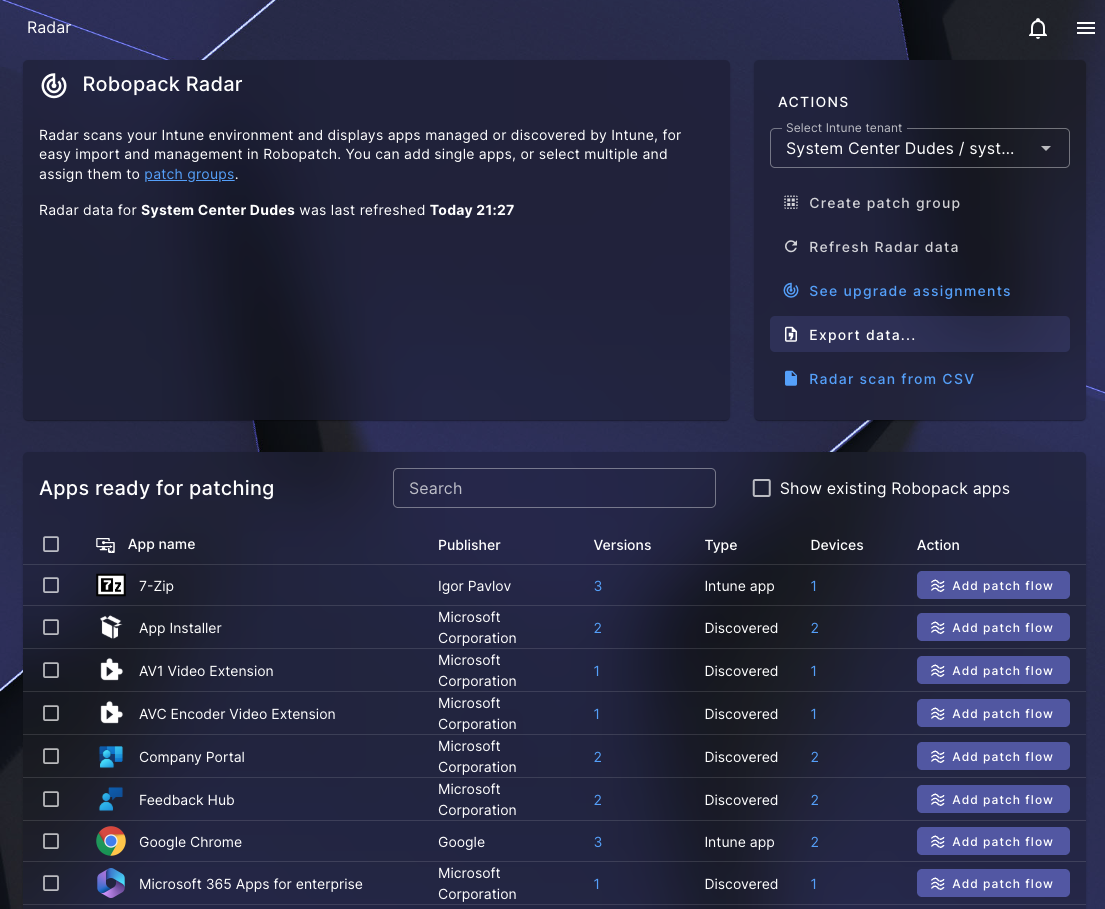
Robopack helps streamline application deployment workflows in Microsoft Intune. With Patch Flow, administrators can automate application update processes and manage how new versions are introduced into their environment.

This helps maintain a more consistent deployment process while reducing the manual effort required to keep applications current.

How Much Does Robopack Cost?

Robopack offers flexible licensing options for organizations of different sizes, from small IT environments to large enterprises managing thousands of devices through Microsoft Intune.

Pricing depends on the number of managed devices, the selected licensing plan, and your organization’s requirements.

Robopack licensing options include:

  • Small Business Licensing: Starting at $1,000 USD per year, providing an affordable option for smaller organizations looking to automate Intune application packaging and patching.
  • Enterprise Licensing: Device-based pricing designed for organizations managing larger Intune environments. Volume discounts may be available depending on the number of devices and subscription terms.
  • Renewals and Upgrades: System Center Dudes can help existing Robopack customers review their licensing options, renew subscriptions, or expand their deployment.

Get Competitive Robopack Pricing Through System Center Dudes

As an authorized Robopack reseller, System Center Dudes can provide a personalized quote based on your device count and licensing needs.

Whether you’re purchasing Robopack for the first time, comparing licensing options, or renewing an existing subscription, our team can help you find the right solution.

Request a free Robopack quote today. No obligation and no consulting services required.

Evaluate Robopack With Our Intune Experts

Since System Center Dudes is an official Robopack partner, here’s how we can work with you to evaluate the platform.

You don’t need to make any commitment up front — we can guide you through the entire discovery and testing process. If you want to:

  • See Robopack in action through a live demo
  • Test it with your own applications with a free 2-week trial
  • Evaluate how Robopack fits into your Intune environment and overall endpoint management strategy
  • Our team will help you get started and support you each step of the way
Trial Setup
We’ll help you set up a full Robopack trial in your production tenant or test tenant, connect it to Microsoft Intune, and guide you through migrating a pilot group of applications. This hands-on approach lets you see real results quickly and understand exactly how Robopack performs in your environment.
Pilot packaging & Patch Flow
We’ll help you select 5–10 key applications, convert them using Robopack’s automated packaging engine, configure wave-based deployments, and closely monitor deployment results to validate performance and reliability in your environment.
Metrics & Assessment
Measure the time savings, deployment success rates, and improvements in patch compliance to clearly demonstrate the value Robopack brings to your environment.

Robopack Technical Resources

Want to learn more about Robopack and how it works with Microsoft Intune? Our technical articles provide practical information, step-by-step guides, and real-world examples to help IT administrators automate application packaging, deployment, and third-party patching.

At System Center Dudes, our consultants work with Microsoft Intune environments every day. We share our experience through technical guides to help organizations better understand Robopack’s capabilities and simplify application management.

Explore our Robopack tutorials and technical resources below to learn how to get started, configure the platform, and improve your Intune application management processes.

Need Help Implementing Robopack in Your Intune Environment?

Beyond licensing, System Center Dudes offers professional services to help you get the most out of Robopack. Our experienced Intune consultants can assist with initial setup, integration, application packaging, Patch Flow configuration, troubleshooting, and ongoing optimization.

Whether you’re deploying Robopack for the first time or looking to improve your existing application management process, our team can help you reduce manual work and accelerate your deployment.

Ready to get started? Contact System Center Dudes to discuss your Robopack implementation or request a quote for our consulting services.

Frequently Asked Questions About Robopack Pricing, Licensing and Microsoft Intune

What is Robopack and how does it work with Microsoft Intune?
Robopack is a cloud-based application management solution that helps IT teams automate Win32 application packaging, deployment, and third-party application updates in Microsoft Intune. It reduces repetitive administrative tasks and simplifies application management.
How much does Robopack cost per device?
Robopack pricing depends on the licensing plan, number of managed devices, and subscription terms. Small business licensing starts at $1,000 USD per year, while enterprise licensing uses device-based pricing. System Center Dudes can provide a personalized quote based on your environment and requirements.
Where can I buy Robopack licenses?
System Center Dudes is an authorized Robopack reseller offering licensing, renewals, and implementation services. Organizations can request competitive pricing, evaluate licensing options, and receive assistance from experienced Microsoft Intune consultants.
Can I try Robopack before purchasing a license?
Yes. Organizations interested in Robopack can request a free trial to evaluate its application packaging, deployment, and patch management capabilities. System Center Dudes can help coordinate a trial and provide guidance during the evaluation process.
Does Robopack automatically package Win32 applications for Intune?
Robopack helps automate the creation and management of Win32 application packages for Microsoft Intune. This reduces the need to manually prepare installers, create packages, and configure repetitive deployment tasks.
Can Robopack automatically update third-party applications in Intune?
Yes. Robopack supports automated third-party application updates through its application management and Patch Flow capabilities. This helps organizations reduce manual packaging work and maintain more consistent application updates.
What is the difference between Robopack and Patch My PC?
Both Robopack and Patch My PC help organizations manage third-party applications in Microsoft Intune. They differ in their packaging workflows, automation capabilities, application catalogs, licensing models, and management features. The best option depends on your organization's application management requirements.
Can I renew my existing Robopack licenses through System Center Dudes?
Yes. Existing Robopack customers can contact System Center Dudes to review renewal pricing, licensing requirements, and available subscription options. Our team can help you prepare your renewal and evaluate any changes to your licensing needs. In practice, both tools help Intune administrators save time and keep applications up to date. The best choice depends on your environment, your processes, and how much automation you want in your packaging workflow. That’s why we encourage organizations to evaluate both solutions and choose the one that best fits their needs.
Does System Center Dudes provide Robopack implementation and support services?
Yes. Beyond licensing, System Center Dudes provides professional services for Robopack deployment, Microsoft Intune integration, application packaging, Patch Flow configuration, troubleshooting, and optimization. Consulting services are optional and can be purchased separately from licensing.
Do I need to purchase consulting services to buy Robopack licenses?
No. You can purchase or renew Robopack licenses through System Center Dudes without purchasing consulting services. Our team can provide licensing information and pricing independently, while technical assistance remains available if needed.