When you’re doing an SCCM installation you have the choice to select HTTP or HTTPS client communication. Most SCCM Installations are installed with HTTP communication between the clients and the site server. We usually always install first using HTTP and then switch to HTTPS if needed by the organization. In this post, we’ll show you how to fix the Check if HTTPS or Enhanced HTTP is enabled for site during an SCCM Site Upgrade. You can also use this post to switch your site to Enhanced HTTP to stay supported after October 31st, 2022.
Microsoft recommends using HTTPS communication for all Configuration Manager communication paths, but it can be challenging due to the overhead of managing PKI certificates. SCCM 1806 includes improvements to how clients communicate with site systems with a new option: Enhanced HTTP.
Before today, you didn’t have to care much about that if your site is configured to allow HTTP communication without enhanced HTTP. This week, Microsoft announced that they are adding HTTP-only client communication to their deprecated feature list. You have until October 31st 2022 to make the switch to Enhanced HTTP or HTTPS.
You’ll also see this warning in the prerequisite check section of an SCCM site upgrade starting with SCCM 2103.
Prerequisite Check – Check if HTTPS or Enhanced HTTP is enabled for site XXX
HTTPS or Enhanced HTTP are not enabled for client communication. HTTP-only communication is deprecated and support will be removed in a future version of Configuration Manager. Enable a more secure communication method for the site either by enabling HTTPS or Enhanced HTTP.
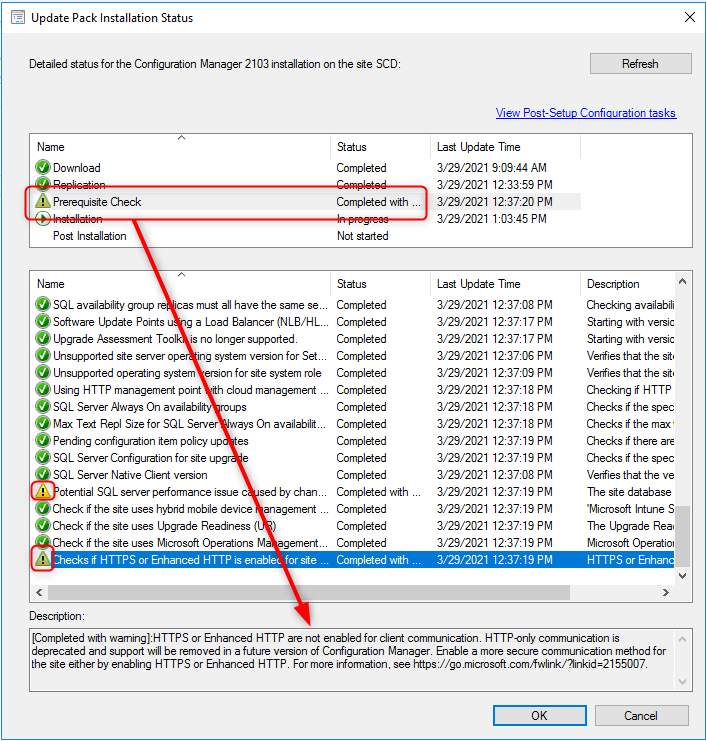
So to stay supported or to dismiss the HTTPS/Enhanced HTTP prerequisite check warning you need to change your client communication methods. Here’s how to do that :
You have 2 choices, you can setup HTTPS communications which requires certificate and PKI configuration or you can enable Enhanced HTTP with a couple of click.
Note : Enhanced HTTP isn’t the same as enabling HTTPS for client communication or a site system.
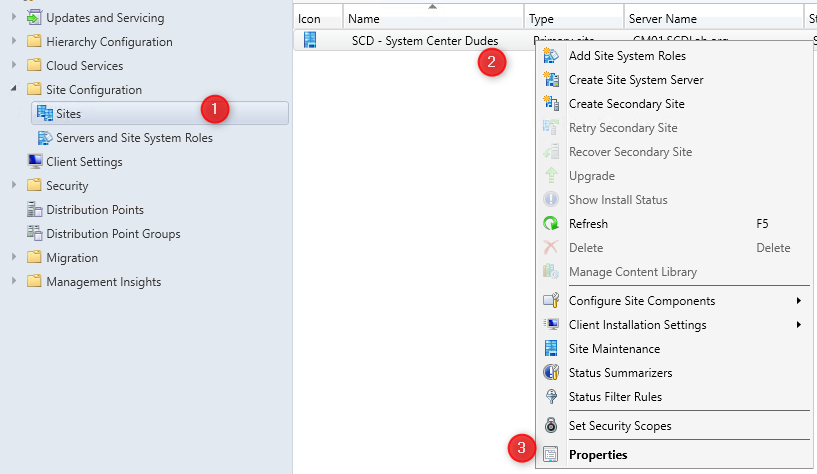
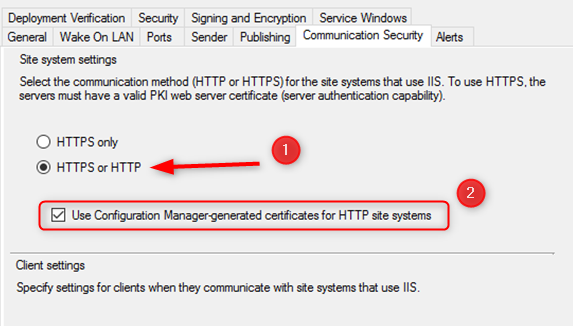
If you prefer enabling the Microsoft recommendation of HTTPS only communication. Please refer to this post which covers it. Be prepared, this is not a straightforward task and must be plan accordingly.

Please fill out the form, and one of our representatives will contact you in Less Than 24 Hours. We are open from Monday to Friday.

Thank you for subscribing to our newsletter or requesting a quote. You will receive our next month's newsletter. If you have requested a quote, we will get in touch with you as soon as possible.

Something went wrong!


Thank for your reply!