The wait is finally over. The next version of SCCM is out. You may heard the name SCCM Vnext or SCCM 2016 but the final name is simply SCCM. This is due to the fact that SCCM is now part of the new SaaS platform which means that its update cycle will be much quicker than before. Each new version will be named as SCCM YYMM (Year Month). The first release is 1511 (for November 2015).
SCCM 1511 brings a whole new set of features. Don’t get surprised, the jump isn’t as big as 2003 to 2007 or 2007 to 2012. The console has the same look and concepts are the same. If you’re upgrading from 2012, the upgrade process is similar as applying a service pack. No need to do a side-by-side migration. See our SCCM 1511 Upgrade guide if you’re ready to upgrade.
If you’re a long time SCCM Administrator, you’ll enjoy the new features. If you’re new to SCCM, welcome to the family! You now have the best management tool available. See our SCCM 1511 Installation guide if you’re ready to install or see our complete blog series if you need help to start from scratch.
The list of new features is pretty long, if you’re planning to have Windows 10 computers, this version is a must. It brings all the management tools you need to migrate and manage it.
In this post, we’ll explain the most interesting SCCM 1511 new features: (in bold)
[Updated 04/25 – We add links to blog articles we wrote after the release of this post]
Windows 10
Infrastructure
Console
Operating System Deployment
Mobile Device Management
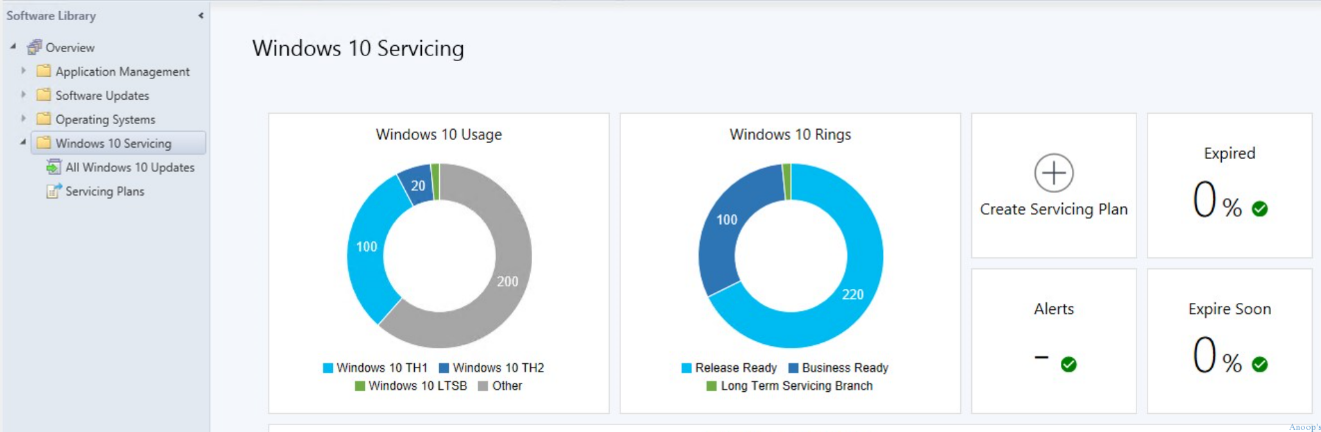
Windows 10 servicing
View the state of Windows as a service in your environment, create servicing plans to form deployment rings and ensure that Windows 10 current branch systems are kept up to date when new builds are released, and view alerts when Windows 10 clients are near end of support for their build of Current Branch or Current Branch for Business.
To access the new Windows 10 servicing node:
Preferred management points
Preferred management points is a new option that enables clients to identify and prefer to communicate with management points that are associated with the clients current network location (or boundary). When configured, clients attempt to use a preferred management point from their assigned site before using management points from their assigned site that are not configured as preferred.
See SP1 post
Natively manage Office 365 desktop client update
Ability to manage Office 365 desktop client updates using the Configuration Manager Software Update Management workflow. When Microsoft publishes a new Office 365 desktop client update to Windows Server Updates Services (WSUS), Configuration Manager will be able to synchronize the update to its catalog if the Office 365 update is configured to be part of the catalog synchronization. The Configuration Manager site server will download the Office 365 client updates and distribute the package to Configuration Manager distribution points. The Configuration Manager client will then inform Office 365 desktop clients where to get the updates and when to start the update installation process.
Prerequisites for this scenario:
At the time of writing these lines, there’s no O365 available in WSUS.
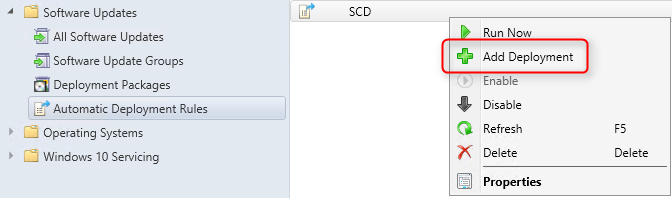
Support for multiple Automatic Deployment Rules
Multiple deployments for each Automatic Deployment Rules (ADR) you use to deploy software updates. This can help you manage the complexity of deploying different updates to different collections.
After an ADR is created, you can go back and then add additional deployments.
To access this functionality :
Updates and servicing
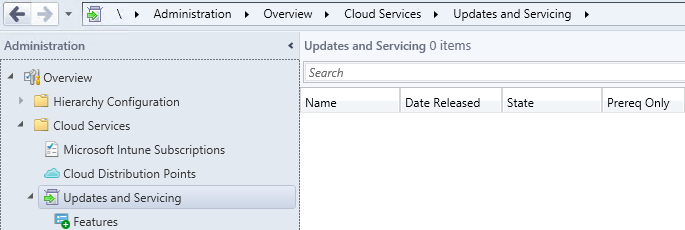
A new update model that helps keep your Configuration Manager deployment current with the latest updates and features. This model replaces the need to install separate service packs, cumulative updates, or Extensions for Microsoft Intune, to gain new functionality. This service model is similar to those seen with other Microsoft products like Windows 10.
When SCCM installs, it automatically configures a new site system role on the site server, the cloud connection point.
This site system role:
Updates for Configuration Manager:
To access this functionality :
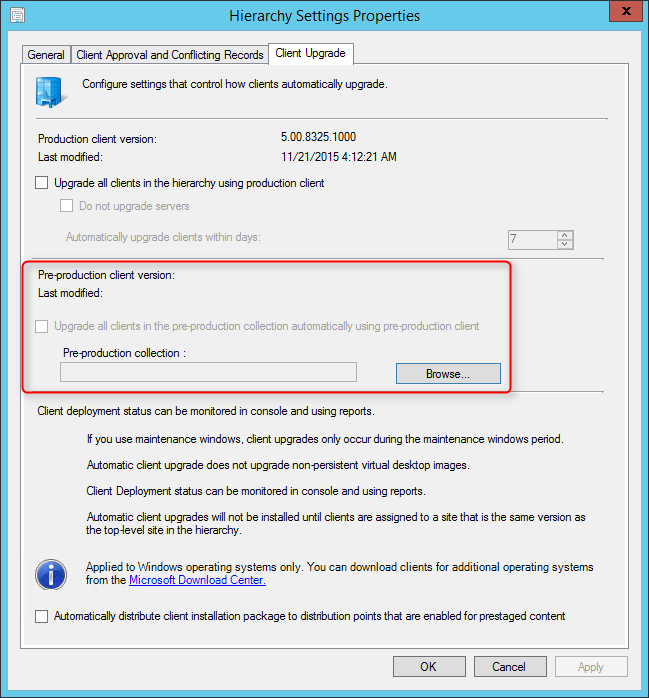
Client piloting to preproduction
With client piloting you can easily deploy and test updates to the Windows client using a pre-production collection while leaving your current client version in use by the remainder of your hierarchy. When you pilot a client update, only the clients that are members of the pre-production collection that you selected install the updated client. At a later time, when you’re ready, you can move the updated client version from pre-production to production, making it available to all your clients.
Prerequisites for this scenario:
To access this functionality :
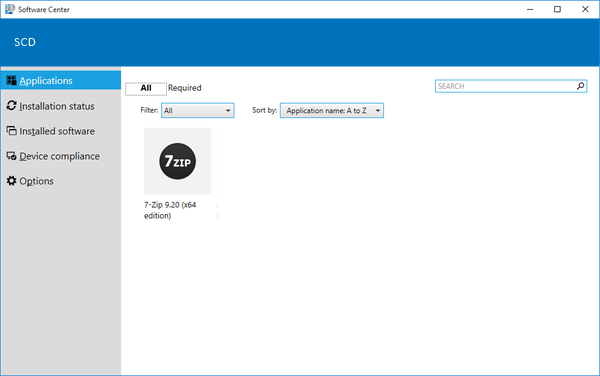
Software Center
Software Center has a new, modern look and apps that previously only appeared in the Application Catalog (user-available apps) now appear in Software Center under the Applications tab.
This makes these deployments more discoverable to users and removes the need for them to use the Application Catalog. Additionally, a Silverlight enabled browser is no longer required.
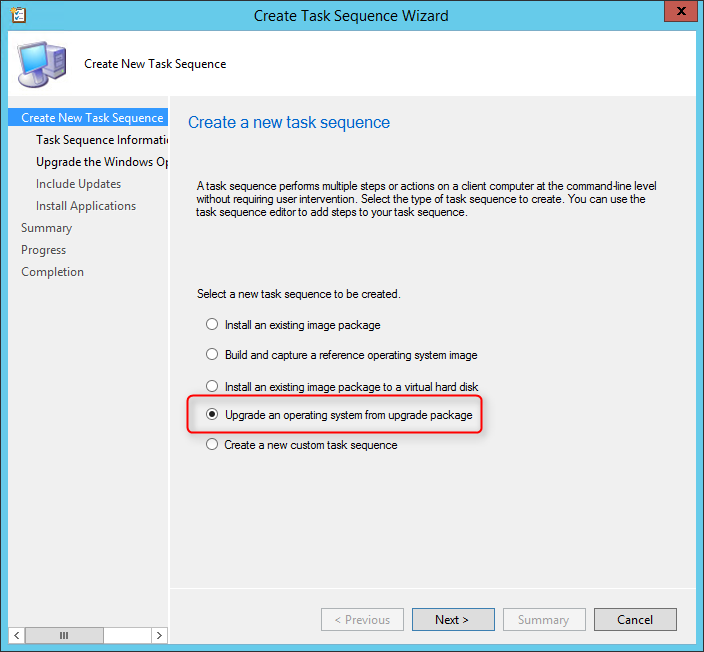
Windows 10 in-place upgrade task sequence
This is a new operating system deployment scenario for upgrading computers that run Windows 7, Windows 8, and Windows 8.1 to run Windows 10.
Windows 10 in-place upgrade:
To access this functionality :
In addition, you can read the complete official list from Technet.

Please fill out the form, and one of our representatives will contact you in Less Than 24 Hours. We are open from Monday to Friday.

Thank you for subscribing to our newsletter or requesting a quote. You will receive our next month's newsletter. If you have requested a quote, we will get in touch with you as soon as possible.

Something went wrong!


Thank for your reply!