I worked in an environment where all DP are set to communicate with HTTPS.
When trying to add a DP as a pull DP source, you get this :
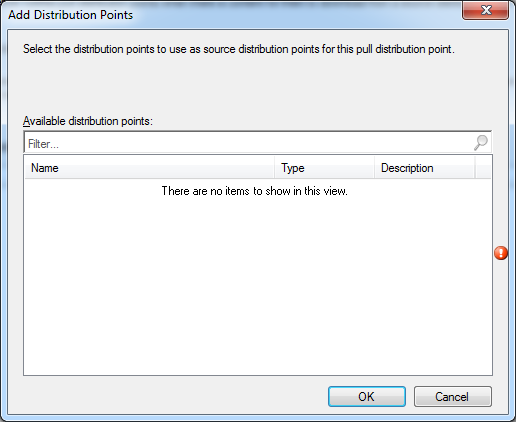
Technet is specifying that “Only distribution points that support HTTP can be specified as a source distribution points when you use the Configuration Manager console”
http://technet.microsoft.com/en-us/library/gg712321.aspx
You can configure a pull-distribution point when you install the distribution point or after it is installed by editing the properties of the distribution point site system role. A distribution point that you configure as a pull-distribution point can transfer content to clients by HTTP or HTTPS. When you configure the pull-distribution point, you must specify one or more source distribution points. Only distribution points that qualify to be source distribution points are displayed. Only distribution points that support HTTP can be specified as a source distribution points when you use the Configuration Manager console. However, you can use the Configuration Manager SDK to specify a source distribution point that is configured for HTTPS. To use a source distribution point that is configured for HTTPS, the pull-distribution point must be co-located on a computer that runs the Configuration Manager client. A pull-distribution point can be specified as a source distribution point for another pull-distribution point.
Unfortunately, the SDK does not include this solution.
Microsoft can provide a script to do so, here’s the instruction and the script.
—————–START———————————–
Const cSourceDP = “FQDN OF SOURCE DP”
Const cTargetDP = “FQDN OF TARGET DP”
Const cServer = “.”
Const cSitecode = “YOUR SITE CODE”
Dim NalPAthArray()
intsize = 0
Set loc = CreateObject(“WbemScripting.SWbemLocator”)
Set WbemServices = loc.ConnectServer(cServer,”root\SMS\site_” & cSitecode)
‘connect to the site control file
Set WbemContext=CreateObject(“WbemScripting.SWbemNamedValueSet”)
WbemContext.Add “SessionHandle”,WbemServices.ExecMethod(“SMS_SiteControlFile”,”GetSessionHandle”).SessionHandle
‘Refresh our copy of the SiteControlFile
WbemServices.ExecMethod “SMS_SiteControlFile.Filetype=2,Sitecode=””” & cSitecode & “”””, “Refresh”, , , WbemContext
‘Retrieve Site Control Item instances
set WbemInstEnum = WbemServices.ExecQuery(“SELECT * FROM SMS_SCI_SysResUse where RoleName=’SMS Distribution Point’ and NALpath like ‘%” & cTargetDP & “%'”, , , WbemContext)
for each wbemInst in WbemInstEnum
Wscript.echo “Rolename: ” & wbemInst.RoleName
wscript.echo “Site Code: ” & wbemInst.SiteCode
‘ Here it breaks: Microsoft VBScript runtime error: Object not a collection
For Each Prop In wbemInst.Props
if Prop.PropertyName = “IsPullDP” then
wscript.echo “Property Name: ” & Prop.PropertyName
wscript.echo “Property Value: ” & Prop.value
Prop.value = “1”
Prop.Value1 =”0″
End if
Next
Set clsNALMethods = WbemServices.Get(“SMS_NAL_Methods”)
clsNALMethods.PackNALPath Array(“Display=\\” & cSourceDP & “\”), “MSWNET”, “\\” & cSourceDP, Array(“SMS_SITE=” & cSitecode),NALPath
For Each Propl in WbemInst.PropLists
if Propl.PropertyListName = “SourceDistributionPoints” then
wscript.echo “Property List Name: ” & PropL.PropertyListName
wscript.echo “Value: ” & NalPath
ReDim Preserve NalPAthArray(intSize)
NalPAthArray(intSize) = NalPath
intSize = intSize + 1
Propl.values = NalPAthArray
wscript.echo “NalPathArray:
” & Join(NalPAthArray)
End if
Next
Set SCICompPath = wbemInst.Put_(wbemChangeFlagUpdateOnly, WbemContext)
Next
‘Commit changes to SC
Set InParams = WbemServices.Get(“SMS_SiteControlFile”).Methods_(“CommitSCF”).InParameters.SpawnInstance_
InParams.SiteCode = cSiteCode
WbemServices.ExecMethod “SMS_SiteControlFile”, “CommitSCF”, InParams, , WbemContext
‘Release SC
WbemServices.Get(“SMS_SiteControlFile”).ReleaseSessionHandle WbemContext.Item(“SessionHandle”).Value
‘Next
Wscript.echo “Done”
—————-END————————-
Once run your HTTPS DP will be listed as a source DP in the available list.

Please fill out the form, and one of our representatives will contact you in Less Than 24 Hours. We are open from Monday to Friday.

Thank you for subscribing to our newsletter or requesting a quote. You will receive our next month's newsletter. If you have requested a quote, we will get in touch with you as soon as possible.

Something went wrong!


Thank for your reply!