Modernize your endpoint management infrastructure with Microsoft Intune.
Are you planning to migrate from Microsoft Configuration Manager (SCCM/MECM) to Microsoft Intune?
Moving from SCCM to Intune is more than simply enrolling devices into the cloud. Applications, device configurations, security policies, Windows updates, and deployment processes all need to be reviewed and migrated.
At System Center Dudes, we help organizations plan and execute their SCCM to Intune migration. Our consultants work with your IT team to understand your existing environment, define a migration strategy, and move workloads to Microsoft Intune with minimal disruption to your users.
Whether you’re planning a complete migration or a gradual transition using co-management, we can help you through the process.
What’s Included in Our SCCM to Intune Migration Service?
Our migration services are adapted to your environment, existing configurations, and business requirements.
1. SCCM and Intune Environment Assessment
Before starting the migration, we review your existing SCCM infrastructure and Microsoft Intune environment to identify what needs to be migrated.
- Review SCCM infrastructure and client configurations
- Assess existing Intune configurations and readiness
- Review device inventory and operating systems
- Identify applications, collections, and deployments
- Review Group Policies and device configuration settings
- Evaluate existing Windows Update management
- Identify dependencies and potential migration challenges
This assessment helps us define a realistic migration scope and avoid unnecessary work.
2. Migration Planning and Strategy
Every SCCM environment is different. Some organizations can move directly to Intune, while others benefit from a phased migration.
Our consultants help you select the best approach.
- Define migration objectives and requirements
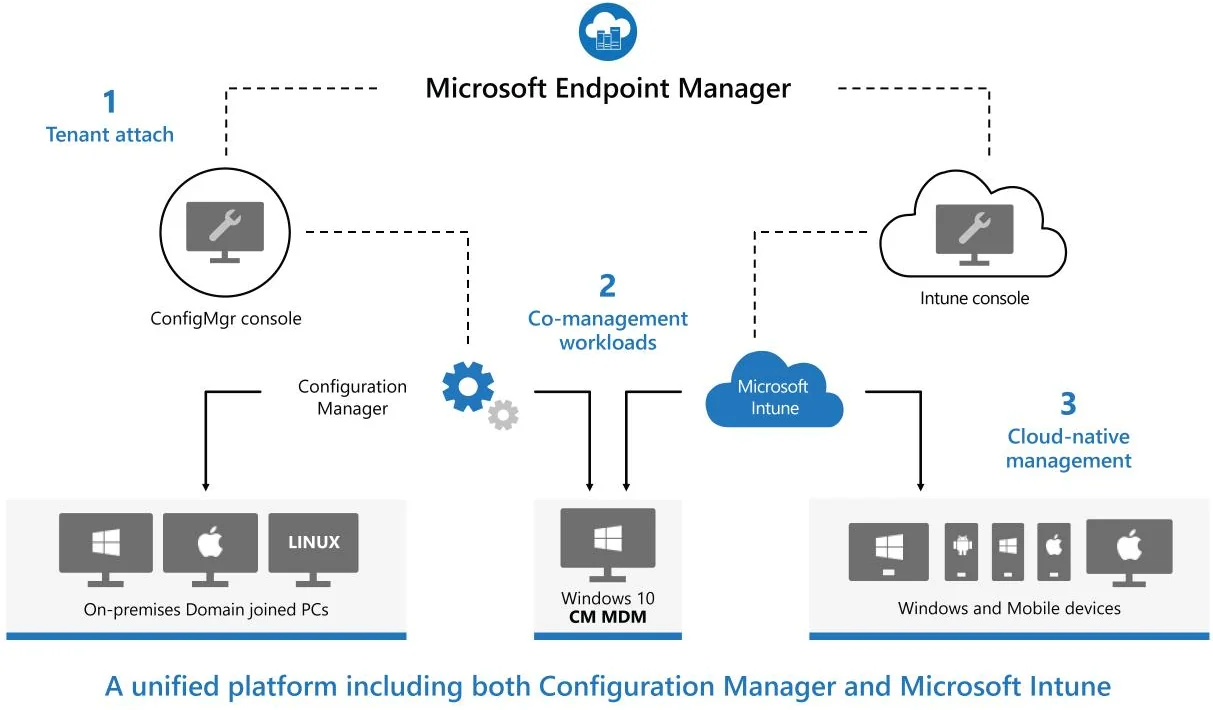
- Evaluate co-management and cloud-native management options
- Identify workloads to migrate
- Establish migration phases and priorities
- Define pilot groups and testing procedures
- Prepare a migration plan and timeline
- Identify potential risks and dependencies
Our goal is to provide a clear migration path that fits your organization.
3. Microsoft Intune Configuration
We help prepare and configure Microsoft Intune to support your migrated devices and workloads.
- Review and configure enrollment settings
- Configure device compliance policies
- Configure device configuration profiles
- Review security baselines and endpoint security settings
- Configure application deployment settings
- Configure Windows Update management
- Review device groups and assignment strategies
We focus on creating a clean and manageable Intune environment rather than simply recreating every existing SCCM configuration.
4. Application Migration
Application deployment is often one of the most time-consuming parts of an SCCM to Intune migration.
We help organizations review their existing applications and migrate the required deployments to Intune.
- Review existing SCCM applications and packages
- Identify applications that need to be migrated
- Prepare Win32 application deployments
- Configure detection rules and installation requirements
- Migrate application assignments
- Test installation and uninstall processes
- Validate application deployment on pilot devices
We can also help evaluate application packaging and automation solutions to simplify ongoing application management.
5. Windows Updates and Patch Management
Moving Windows Update management from SCCM to Intune requires proper planning to avoid conflicts and maintain patch compliance.
- Review existing SCCM Software Update configurations
- Evaluate Windows Update for Business and Windows Autopatch
- Configure update rings and deployment policies
- Configure quality and feature update settings
- Transition update management workloads
- Test and validate Windows Update deployments
- Review update reporting and compliance
6. Device Migration and Pilot Deployment
Once the environment is ready, we begin migrating devices in controlled phases.
- Select and prepare pilot devices
- Configure co-management workload transitions, if applicable
- Enroll or transition devices to Microsoft Intune
- Validate application and policy deployments
- Troubleshoot enrollment and configuration issues
- Expand deployment to additional device groups
- Monitor migration progress and resolve issues
Depending on the environment, devices may be transitioned using co-management or reprovisioned through Windows Autopilot.
7. SCCM Decommissioning
For organizations planning a complete migration, we can also assist with retiring the existing SCCM infrastructure.
- Validate that required workloads have been migrated
- Review remaining SCCM dependencies
- Confirm device management readiness
- Prepare a decommissioning plan
- Remove unnecessary SCCM components
- Assist with SCCM infrastructure retirement
Decommissioning is performed only after the required workloads and dependencies have been reviewed and validated.
8. Documentation and Knowledge Transfer
Our goal is not only to complete the migration but also to ensure your IT team can manage the new environment independently.
- Document implemented Intune configurations
- Provide migration and deployment procedures
- Review ongoing management tasks
- Explain troubleshooting and monitoring processes
- Share recommendations and best practices
- Conduct knowledge transfer sessions with your IT team
Benefits of Migrating from SCCM to Intune
Simplified Infrastructure
Reduce your dependency on on-premises SCCM infrastructure and associated server maintenance.
Cloud-Based Device Management
Manage corporate devices over the internet without requiring traditional on-premises connectivity for supported workloads.
Modern Windows Deployment
Use Windows Autopilot to simplify device provisioning and reduce manual imaging tasks.
Improved Security Management
Manage compliance policies, endpoint security configurations, and device settings through Microsoft Intune.
Simplified Windows Updates
Take advantage of Windows Update for Business and Windows Autopatch to modernize your patch management processes.
Reduced Administrative Overhead
Consolidate endpoint management operations and reduce the infrastructure required to support your devices.
Complete Migration or Co-Management?
Not every organization needs to completely remove SCCM immediately.
Some companies prefer to keep SCCM and Intune running together while gradually transitioning workloads. Others want to move directly to cloud-native device management.
We support both approaches.
Co-Management
Keep SCCM and Intune working together while gradually moving supported workloads to cloud management.
Full SCCM to Intune Migration
Transition supported device management workloads to Intune and retire SCCM when it is no longer required.
Our consultants will help determine which approach makes the most sense based on your environment and requirements.
Why Choose System Center Dudes?
System Center Dudes specializes in Microsoft SCCM, Intune, and endpoint management.
Our consultants have extensive experience managing and migrating enterprise environments, including organizations with thousands of devices.
We understand both SCCM and Intune, which is important when transitioning from traditional on-premises management to cloud-based management.
Our approach is practical: assess the existing environment, identify what needs to change, implement the migration, and transfer the knowledge to your IT team.
We can manage the complete project or work alongside your internal team, depending on your needs.
Flexible SCCM to Intune Migration Consulting
Every migration project is different. The required effort depends on the number of devices, applications, policies, existing infrastructure, and migration approach.
We offer flexible engagement options:
- Fixed-Price Projects: A defined scope of work with agreed deliverables and pricing.
- Time Banks: Prepaid consulting hours that can be used throughout the migration.
- Time & Materials: Consulting services billed based on the actual work performed.
Any remaining time bank hours can also be used for other SCCM or Intune tasks, including troubleshooting, optimization, documentation, and training.
Ready to Migrate from SCCM to Intune?
Whether you’re just starting to evaluate Microsoft Intune or already planning to retire SCCM, our consultants can help you build a migration strategy and execute the project.







Thank for your reply!