Do you have a high number of distribution point in your SCCM environment? Managing large SCCM environment with many Distribution Point or Pull Distribution Point is not an easy task. We’ve done a great post on 8 ways to monitor your Distribution Point, it was most related to the console monitoring and reports. We also provided a report to manage content on your Distribution Point. Additionally, you can use collections to regroup Distribution Point based on specific information. The advantage of using collections is that an action that can be taken based on the membership. (compliance settings, applications, etc.)
This post will explain various tips to improve your day to day SCCM Distribution Point Management.
First of all, we will create a collection to keep track of computers acting as Distribution Point or to target members of a Distribution Points Group.
[pastacode lang=”sql” message=”” highlight=”” provider=”manual” manual=”select%20SMS_R_SYSTEM.ResourceID%2CSMS_R_SYSTEM.ResourceType%2CSMS_R_SYSTEM.Name%2CSMS_R_SYSTEM.SMSUniqueIdentifier%2CSMS_R_SYSTEM.ResourceDomainORWorkgroup%2CSMS_R_SYSTEM.Client%0A%20from%20SMS_R_System%20%0Awhere%20SMS_R_System.ResourceNames%20in%20(Select%20ServerName%20FROM%20SMS_DistributionPointInfo)”/]
Based on that collection, you can create any check you want to find missing Distribution Point by using the Include / Exclude feature of collection membership.
For example, all computers having a name ending with P2 should be a Distribution Point in my environment. To find them, we will create a combination of queries :
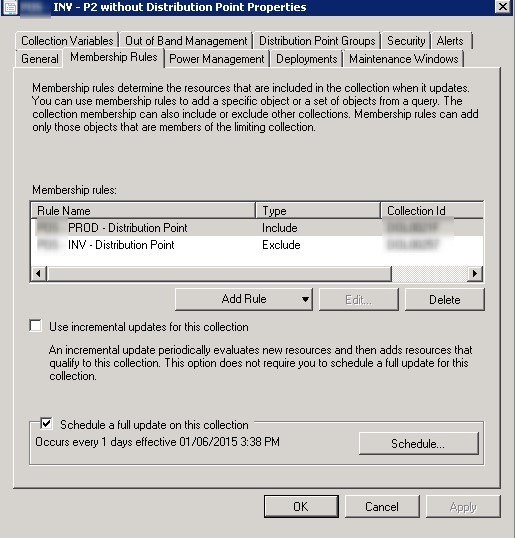
You now have a collection that lists the distribution points dedicated servers without a distribution point role installed.
Now that we have targeted servers and DP roles, you can use them to apply a different search criteria. It can be useful to validate what are the members of Distribution Point groups based on other requirement. For example, we want to prevent having English content on Distribution Point that only require French content.
To do it, we created Distribution Point groups and added Distribution Point to those groups based on the language. In order to create collection queries, we need the Distribution Point GroupID. It can be found directly within the console :
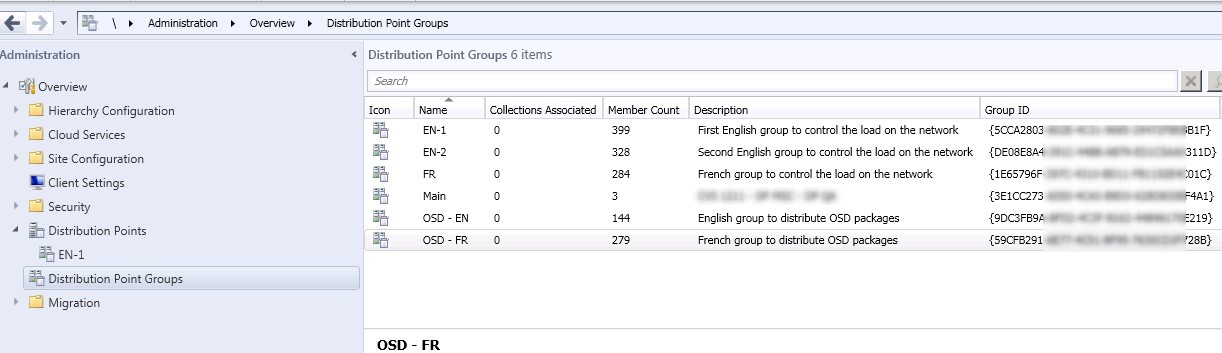
Create a new collections for each GroupID and use this query :
Replace GroupID value from the query with yours and then you’ll have collections based on DP groups!
[pastacode lang=”sql” message=”” highlight=”” provider=”manual” manual=”select%20SMS_R_SYSTEM.ResourceID%2CSMS_R_SYSTEM.ResourceType%2CSMS_R_SYSTEM.Name%2CSMS_R_SYSTEM.SMSUniqueIdentifier%2CSMS_R_SYSTEM.ResourceDomainORWorkgroup%2CSMS_R_SYSTEM.Client%20%0Afrom%20SMS_R_System%20%20%20%20%0Awhere%20SMS_R_System.ResourceNames%20in%20(%0ASelect%20ServerName%0A%20FROM%20SMS_DistributionPointInfo%20%0Ajoin%20SMS_DPGroupMembers%20on%20SMS_DistributionPointInfo.NALPath%3D%20SMS_DPGroupMembers.DPNALPath%20%20%0Awhere%20GroupID%20%3D%20’%7B5CCA2803-XXXXXXXXXXXXXXXX-29472F8EBB1F%7D’)”/]

To validate if the DP has the right packages/OS language hosted on it, use Include/Exclude feature and the limiting collection.
By limiting a collection to English Computer, but we query the French group.
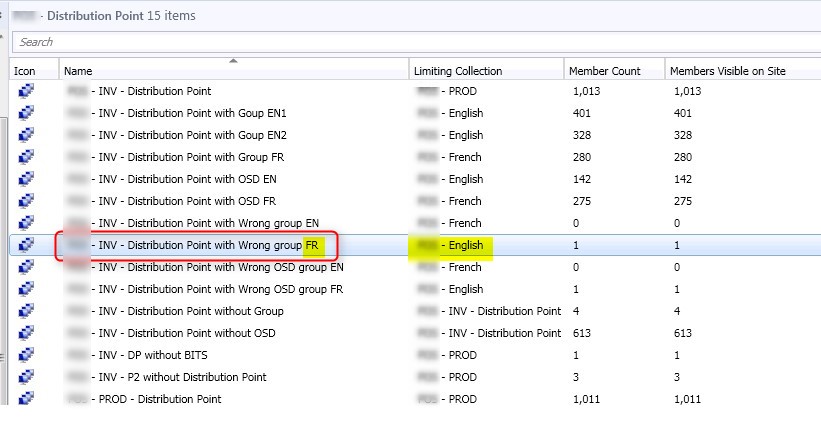 We then know that someone made a mistake and distributed the wrong set of Packages/OS.
This is just an exemple of the possibility you can make using collections based on Distribution Point. Use the comment section to tell us how you manage your DP.

Please fill out the form, and one of our representatives will contact you in Less Than 24 Hours. We are open from Monday to Friday.

Thank you for subscribing to our newsletter or requesting a quote. You will receive our next month's newsletter. If you have requested a quote, we will get in touch with you as soon as possible.

Something went wrong!


Thank for your reply!