

Updating your SCCM Boot Images for devices with hardened Secure Boot
SCD Consultant, Contributor. Specialized in Microsoft Endpoint Manager (SCCM, InTune), Windows Autopilot, Windows10 (11) and Office365 Deployment and maintenance.

Marc-Andre Chartrand
Table of Content






Share


Get the latest insights and exclusive content delivered to your inbox
As you’re probably aware by now, Secure Boot’s Microsoft 2011 CA certificates are expiring in June 2026. While updating the CA Certs to the 2023 ones is a priority, this is just a part of the actions needed to “secure” Secure Boot. This blog post will get you through all the details of what else needs to be done to remediate security vulnerabilities in Secure Boot, but essentially, it comes down to 4 mitigation steps:
- Updating Secure Boot’s DB so it trusts the 2023 CA Certs
- Changing your OS’s boot loader to the one that uses the 2023 cert
- Revoking the 2011 certificate so the device can no longer boot from any boot loaders that don’t have the 2023 cert
- Applying a firmware lock on the minimum Secure Version Number required to boot
- As updates are pushed to Secure Boot, it increases its SVN, and we can tell the firmware to reject any boot images that are below a certain version (usually the one that the OS applying the change supports)
As you harden Secure Boot, there are 2 “breaking” changes that may prevent you from booting some OS Images. This blog post will walk you through updating your SCCM Boot Images for devices with hardened Secure Boot for PXE Booting.
Secure Boot SCCM PXE Boot after revoking the 2011 Certificates
Remediation step 3 will tell Secure Boot that the 2011 cert is removed, and so it will not accept booting from any images that is signed by this CA cert, and that includes SCCM’s boot image. Fortunately, Microsoft gave us a simple way to update our boot images to tell them to use the boot loader signed by the 2023 CA cert, for SCCM PXE booting at least. USB is a different story, which we’ll cover in another section.
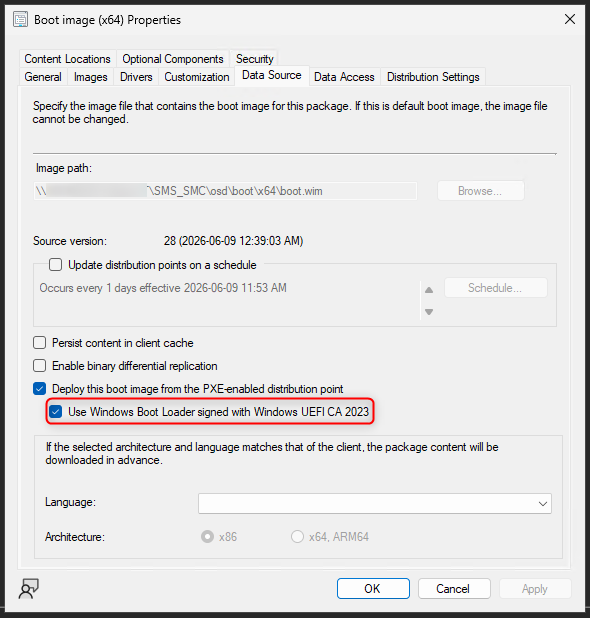
To be able to see the “Use Windows Boot Loader signed with Windows UEFI CA 2023” checkbox, there are a few prerequisites:
- Configuration Manager must be on version 2509 and above
- Have a distribution point with PXE enabled without WDS (Using the ConfigMgr PXE Responder)
- the latest SUPPORTED version of the ADK and its WinPE Add-on
- verify that the version of the ADK you’re installing is supported by your configuration manager, as the latest as of now, 10.0.28000, is not supported and is known to cause issues
Once you have all the Secure Boot SCCM PXE pre-requisites, you may
- Go to your SCCM Console
- Software Library -> Operating Systems -> Boot images
- Right-click on your production boot image -> Properties
- Go to the Data Source tab
- Click the Checkbox “Use Windows Boot Loader signed with Windows UEFI CA 2023
- Press apply
If you don’t see the checkbox in the Data Source tab, reload your boot image from the ADK:
- go to your SCCM Console
- Software Library -> Operating Systems -> Boot images
- Right-click on your production boot image -> Update distribution Points
- Hit the checkbox to reload the boot image with the current WinPE version from the ADK
- Hit next, let it complete, and then check again. The checkbox should now be there
That’s it, if you only had Mitigation 1, 2 and 3 applied to the device, this will allow it to boot. But what if you went all the way and also applied Mitigation 4?
Patching your boot image to match the required SVN
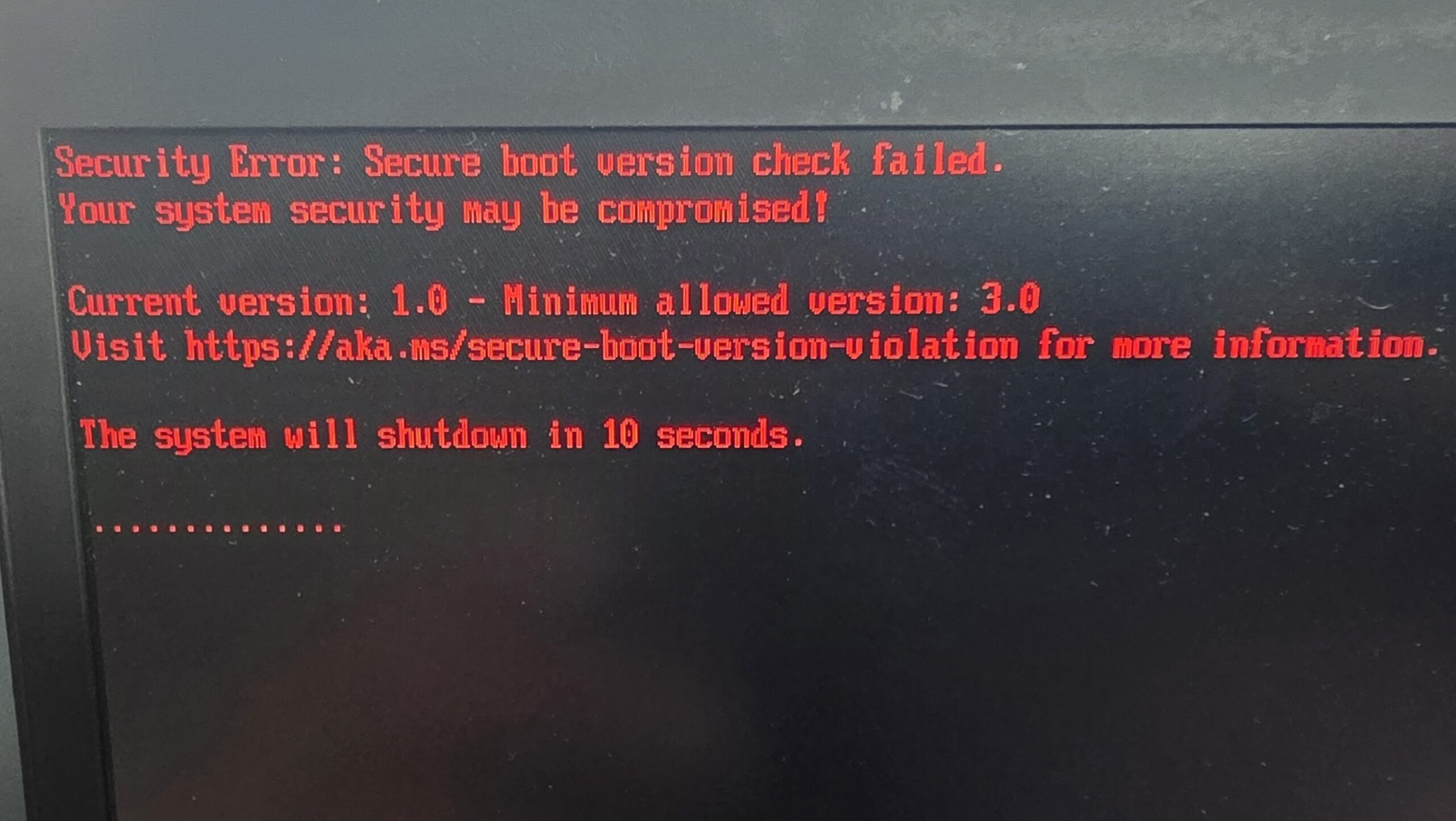
If you applied the firmware lock on the SVN, then you’re likely getting an error like this one:
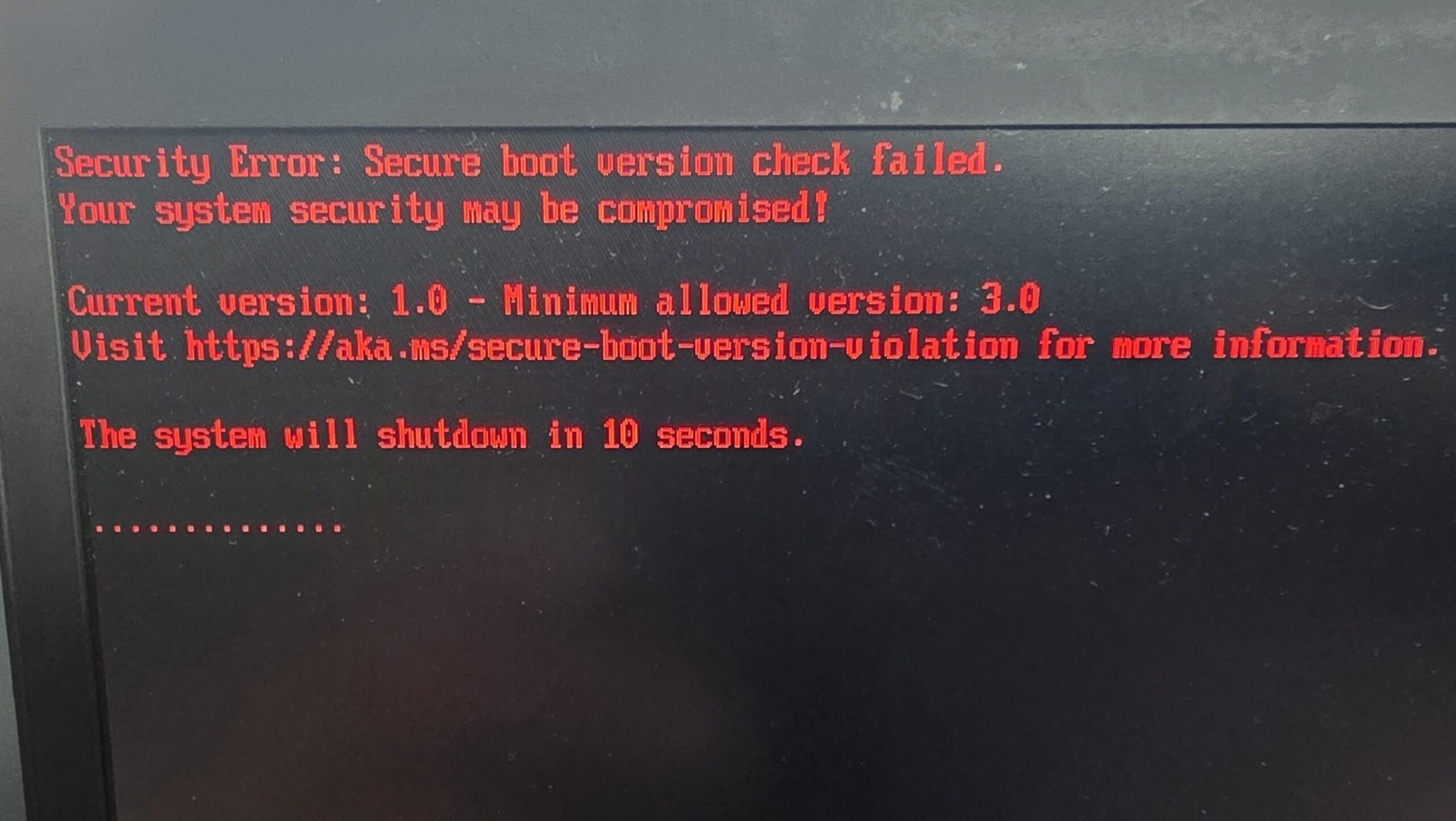
SVN patches are baked inside the Cumulative Updates of Windows, and it’s no different for WinPE. If you want to increase your Secure Version number, you must inject the latest cumulative update that applied to the WinPE image of your ADK.
Using a Script that will do it automatically
If you don’t want to bother with the manual steps (why would you?), then I made a script that will automate the process. It will detect your ADK’s installation folder, download the latest cumulative update that applies to your ADK version, mount your WinPE.wim from the ADK, inject the cumulative update in it, commit the WIM and place it back in the ADK’s installation folder where SCCM expects to find it.
In short, all you have to do is run this PowerShell script, and tell SCCM to reload the image from the ADK
[CmdletBinding()]
param(
    # --- WinPE image / DISM location (blank = auto-detect from the ADK in the registry) ---
    [string]$Architecture   = 'amd64',
    [string]$LangFolder     = 'en-us',
    [string]$WinPEImagePath = '',
    [string]$DismPath       = '',

    # --- Which update to fetch ---
    [string]$SearchTerm       = 'Cumulative Update for Windows 11 Version 24H2 x64',
    [string]$KbArticle        = '',   # target a specific KB instead of "latest"
    [string]$LocalPackagePath = '',   # skip the catalog; apply this .msu/.cab (or a folder of them)
    [switch]$IncludePreview,          # allow Preview CUs when picking the latest

    # --- Catalog fetch behavior ---
    [string]$Proxy = '',
    [int]$CatalogRetryCount = 4,
    [int]$CatalogRetryDelaySeconds = 10,

    # --- Working space / output ---
    [string]$WorkRoot  = '',          # blank = local fixed drive with the most free space
    [int]$MinFreeGB    = 15,          # abort if the working drive has less free than this
    [string]$LogFolder = 'C:\Windows\Temp\OSD_Logs',
    [switch]$ResetBase,               # run /Cleanup-Image /ResetBase before commit
    [switch]$NoReplace,               # leave serviced image in the work folder, do not touch the ADK
    [switch]$Unattended               # skip the Y/N prompt
)

# ---------- step-runner helpers (ASCII) ----------
function Write-Step { param([string]$Message) Write-Host ''; Write-Host ('=' * 72); Write-Host ('  ' + $Message); Write-Host ('=' * 72) }
function Write-Info { param([string]$Message) Write-Host ('[INFO ] ' + $Message) }
function Write-Good { param([string]$Message) Write-Host ('[ OK  ] ' + $Message) -ForegroundColor Green }
function Write-Warn { param([string]$Message) Write-Host ('[WARN ] ' + $Message) -ForegroundColor Yellow }
function Write-Err  { param([string]$Message) Write-Host ('[FAIL ] ' + $Message) -ForegroundColor Red }

function Test-Admin {
    $pr = New-Object Security.Principal.WindowsPrincipal([Security.Principal.WindowsIdentity]::GetCurrent())
    return $pr.IsInRole([Security.Principal.WindowsBuiltInRole]::Administrator)
}

function Get-KitsRoot10 {
    foreach ($k in @('HKLM:\SOFTWARE\WOW6432Node\Microsoft\Windows Kits\Installed Roots',
                     'HKLM:\SOFTWARE\Microsoft\Windows Kits\Installed Roots')) {
        if (Test-Path $k) {
            $val = (Get-ItemProperty -Path $k -ErrorAction SilentlyContinue).KitsRoot10
            if ($val) { return $val }
        }
    }
    return $null
}

# Free space (GB) on the drive holding $Path.
function Get-FreeGB {
    param([string]$Path)
    $root = [System.IO.Path]::GetPathRoot($Path)
    if ([string]::IsNullOrWhiteSpace($root)) { return 0 }
    try { return [math]::Round((New-Object System.IO.DriveInfo($root)).AvailableFreeSpace / 1GB, 1) } catch { return 0 }
}

# Local fixed drive with the most free space that we can write to -> a WinPE_Servicing path on it.
function Select-BestWorkRoot {
    $disks = Get-CimInstance Win32_LogicalDisk -Filter 'DriveType=3' -ErrorAction SilentlyContinue | Sort-Object FreeSpace -Descending
    if (-not $disks) { throw 'Could not enumerate local drives. Pass -WorkRoot explicitly.' }
    foreach ($d in $disks) {
        $candidate = Join-Path ($d.DeviceID + '\') 'WinPE_Servicing'
        try {
            if (-not (Test-Path $candidate)) { New-Item -Path $candidate -ItemType Directory -Force -ErrorAction Stop | Out-Null }
            else {
                $probe = Join-Path $candidate ('.probe_' + [guid]::NewGuid().ToString('N'))
                New-Item -Path $probe -ItemType File -Force -ErrorAction Stop | Out-Null
                Remove-Item $probe -Force -ErrorAction SilentlyContinue
            }
            return $candidate
        } catch { continue }
    }
    throw 'Could not find a writable local drive for the working folder. Pass -WorkRoot explicitly.'
}

# Run dism.exe. -PassThru + cached .Handle (not -Wait): avoids the ~10 min DismHost wait and the
# null-ExitCode that -PassThru otherwise returns after the process exits.
function Invoke-Dism {
    param([string]$DismExe, [string[]]$Arguments)
    Write-Info ('dism.exe ' + ($Arguments -join ' '))
    $proc = Start-Process -FilePath $DismExe -ArgumentList $Arguments -NoNewWindow -PassThru
    $null = $proc.Handle
    $proc.WaitForExit()
    $code = $proc.ExitCode
    if ($code -ne 0 -and $code -ne 3010) { throw ('DISM returned exit code ' + $code + ' for: ' + ($Arguments -join ' ')) }
}

# Boot manager file versions inside a mounted image (a proxy for SVN; logged before/after).
function Get-BootMgrVersion {
    param([string]$MountDir)
    $result = @()
    foreach ($name in @('bootmgfw.efi', 'bootmgfw_EX.efi', 'bootmgr.efi')) {
        $fp = Join-Path $MountDir ('Windows\Boot\EFI\' + $name)
        if (Test-Path $fp) { $result += ('{0} = {1}' -f $name, (Get-Item $fp).VersionInfo.ProductVersion) }
    }
    if ($result.Count -eq 0) { return '(no boot files found)' }
    return ($result -join '  |  ')
}

# Retry wrapper for the flaky catalog calls.
function Invoke-WithRetry {
    param([scriptblock]$Action, [int]$Retries, [int]$DelaySeconds, [string]$What)
    for ($attempt = 1; $attempt -le $Retries; $attempt++) {
        try { return (& $Action) }
        catch {
            Write-Warn ($What + ' attempt ' + $attempt + ' of ' + $Retries + ' failed: ' + $_.Exception.Message)
            if ($attempt -lt $Retries) { Start-Sleep -Seconds $DelaySeconds } else { throw }
        }
    }
}

# One web call for all catalog requests (applies proxy + user agent).
function Invoke-CatalogRequest {
    param([string]$Uri, [string]$Method = 'Get', $Body = $null, [string]$OutFile = '')
    $params = @{ Uri = $Uri; Method = $Method; UseBasicParsing = $true; TimeoutSec = 120 }
    if ($Body)    { $params.Body = $Body }
    if ($OutFile) { $params.OutFile = $OutFile }
    if ($script:CatalogProxy) { $params.Proxy = $script:CatalogProxy; $params.ProxyUseDefaultCredentials = $true }
    if ($script:CatalogUserAgent) { $params.UserAgent = $script:CatalogUserAgent }
    return Invoke-WebRequest @params
}

# Query the catalog search page; return the newest matching cumulative update.
function Get-LatestCatalogUpdate {
    param([string]$Query, [bool]$IncludePreviewUpdates, [int]$Retries, [int]$DelaySeconds)

    $searchUrl = 'https://www.catalog.update.microsoft.com/Search.aspx?q=' + [uri]::EscapeDataString($Query)
    Write-Info ('Catalog search: ' + $searchUrl)
    $resp = Invoke-WithRetry -What 'Catalog search' -Retries $Retries -DelaySeconds $DelaySeconds -Action {
        $r = Invoke-CatalogRequest -Uri $searchUrl
        if ($r.Content -match 'site has encountered an error') { throw 'Catalog returned its error page.' }
        $r
    }
    $content = $resp.Content

    # Result rows carry an anchor: id='_link'>Title</a> (single OR double quotes).
    $linkMatches = [regex]::Matches($content, '(?s)id=[''"]([0-9a-fA-F-]{36})_link[''"][^>]*>(.*?)</a>')
    Write-Info ('Parsed ' + $linkMatches.Count + ' result anchors from the search page.')
    if ($linkMatches.Count -eq 0) {
        throw ('Parsed 0 result rows. Query returned nothing or the catalog markup changed. ' +
               'Try a different -SearchTerm or -KbArticle, or use -LocalPackagePath.')
    }

    $items = New-Object System.Collections.ArrayList
    foreach ($m in $linkMatches) {
        $guid  = $m.Groups[1].Value
        $title = ($m.Groups[2].Value -replace ']+>', '' -replace '\s+', ' ').Trim()
        $window = $content.Substring($m.Index, [Math]::Min(1500, $content.Length - $m.Index))

        # Recency keys that ignore locale/date-column format: KB number and a YYYY-MM title prefix.
        $kb = [int64]0; if ($title -match 'KB(\d{6,})') { $kb = [int64]$Matches[1] }
        $ym = '';       if ($title -match '(\d{4})[-/](\d{2})\b') { $ym = $Matches[1] + $Matches[2] }

        # Last Updated parsed leniently, used only as a final tiebreaker.
        $date = [datetime]::MinValue
        $dm = [regex]::Match($window, '\d{1,2}/\d{1,2}/\d{4}')
        if ($dm.Success) {
            $tmp = [datetime]::MinValue
            if ([datetime]::TryParse($dm.Value, [Globalization.CultureInfo]::InvariantCulture, [Globalization.DateTimeStyles]::None, [ref]$tmp)) { $date = $tmp }
        }
        $size = ''; $sm = [regex]::Match($window, '\d+(?:[.,]\d+)?\s*(?:KB|MB|GB)'); if ($sm.Success) { $size = $sm.Value }

        [void]$items.Add([pscustomobject]@{ Guid = $guid; Title = $title; Kb = $kb; YearMonth = $ym; LastUpdated = $date; SizeText = $size })
    }

    $candidates = @($items | Where-Object {
        $_.Title -match 'Cumulative Update' -and $_.Title -notmatch '\.NET' -and
        $_.Title -notmatch 'Dynamic' -and $_.Title -notmatch 'arm64' -and
        ($IncludePreviewUpdates -or $_.Title -notmatch 'Preview')
    })
    Write-Info ('Matched ' + $candidates.Count + ' cumulative-update entries after filtering.')
    if ($candidates.Count -eq 0) {
        Write-Warn 'Anchors parsed but none matched the cumulative-update filter. First few titles:'
        $items | Select-Object -First 5 | ForEach-Object { Write-Warn ('  - ' + $_.Title) }
        return $null
    }

    # Newest by release month (title YYYY-MM), then KB, then date. KB alone is not monotonic by date.
    return $candidates | Sort-Object @{Expression={$_.YearMonth};Descending=$true}, @{Expression={$_.Kb};Descending=$true}, @{Expression={$_.LastUpdated};Descending=$true} | Select-Object -First 1
}

# Resolve the real download URL(s) for a catalog update GUID via the download dialog.
function Get-CatalogDownloadUrl {
    param([string]$Guid, [int]$Retries, [int]$DelaySeconds)
    $body = @{ updateIDs = '[{"size":0,"languages":"","uidInfo":"' + $Guid + '","updateID":"' + $Guid + '"}]' }
    $resp = Invoke-WithRetry -What 'Download dialog' -Retries $Retries -DelaySeconds $DelaySeconds -Action {
        Invoke-CatalogRequest -Uri 'https://www.catalog.update.microsoft.com/DownloadDialog.aspx' -Method 'Post' -Body $body
    }
    return [regex]::Matches($resp.Content, 'https?://[^''"]+?\.(?:msu|cab)') | ForEach-Object { $_.Value } | Select-Object -Unique
}

# Download a file, preferring BITS (good for large CU packages), falling back to Invoke-WebRequest.
function Save-File {
    param([string]$Url, [string]$Destination)
    try {
        Import-Module BitsTransfer -ErrorAction Stop
        $bits = @{ Source = $Url; Destination = $Destination; ErrorAction = 'Stop' }
        if ($script:CatalogProxy) { $bits.ProxyUsage = 'Override'; $bits.ProxyList = $script:CatalogProxy }
        Start-BitsTransfer @bits
    }
    catch {
        Write-Warn ('BITS unavailable (' + $_.Exception.Message + '). Falling back to Invoke-WebRequest.')
        $oldPref = $ProgressPreference; $ProgressPreference = 'SilentlyContinue'
        try { Invoke-CatalogRequest -Uri $Url -OutFile $Destination | Out-Null } finally { $ProgressPreference = $oldPref }
    }
}

# ---------- setup ----------
if (-not (Test-Path $LogFolder)) { New-Item -Path $LogFolder -ItemType Directory -Force | Out-Null }
$stamp   = Get-Date -Format 'yyyyMMdd_HHmmss'
$logFile = Join-Path $LogFolder ('SCD_Update_WinPE_LatestCU_' + $stamp + '.log')
Start-Transcript -Path $logFile -Force | Out-Null

[Net.ServicePointManager]::SecurityProtocol = [Net.ServicePointManager]::SecurityProtocol -bor [Net.SecurityProtocolType]::Tls12
$script:CatalogProxy     = if ($Proxy) { $Proxy } else { $null }
$script:CatalogUserAgent = 'Mozilla/5.0 (Windows NT 10.0; Win64; x64) AppleWebKit/537.36 (KHTML, like Gecko) Chrome/124.0 Safari/537.36'

$MountDir = ''; $mounted = $false; $DismExe = $null

try {
    Write-Step 'WinPE Cumulative Update Servicing - System Center Dudes'

    # --- 1. Validate environment ---
    Write-Step '1. Validating environment'
    if (-not (Test-Admin)) { throw 'This script must run from an elevated PowerShell session.' }
    Write-Good 'Running elevated.'

    if ([string]::IsNullOrWhiteSpace($WinPEImagePath) -or [string]::IsNullOrWhiteSpace($DismPath)) {
        $kits = Get-KitsRoot10
        if (-not $kits) { throw 'Could not locate KitsRoot10 in the registry. Specify -WinPEImagePath and -DismPath.' }
        $adkRoot = Join-Path $kits 'Assessment and Deployment Kit'
        if ([string]::IsNullOrWhiteSpace($WinPEImagePath)) {
            $WinPEImagePath = Join-Path $adkRoot ('Windows Preinstallation Environment\' + $Architecture + '\' + $LangFolder + '\winpe.wim')
        }
        if ([string]::IsNullOrWhiteSpace($DismPath)) {
            $candidate = Join-Path $adkRoot ('Deployment Tools\' + $Architecture + '\DISM\dism.exe')
            if (Test-Path $candidate) { $DismPath = $candidate }
        }
    }
    if (-not (Test-Path $WinPEImagePath)) { throw ('WinPE image not found: ' + $WinPEImagePath) }
    Write-Good ('WinPE image: ' + $WinPEImagePath)

    if ([string]::IsNullOrWhiteSpace($DismPath) -or -not (Test-Path $DismPath)) {
        $DismExe = (Join-Path $env:SystemRoot 'System32\dism.exe')
        Write-Warn 'ADK Deployment Tools DISM not found; using in-box dism.exe (install the ADK tools if servicing errors on version).'
    } else { $DismExe = $DismPath }
    Write-Good ('DISM: ' + $DismExe)

    # Working folder: auto-pick the roomiest writable drive when not specified, then check space.
    if ([string]::IsNullOrWhiteSpace($WorkRoot)) {
        $WorkRoot = Select-BestWorkRoot
        Write-Good ('Auto-selected working folder (most free space): ' + $WorkRoot)
    } else { Write-Good ('Working folder: ' + $WorkRoot) }
    $MountDir = Join-Path $WorkRoot 'Mount'

    $workFree = Get-FreeGB -Path $WorkRoot
    Write-Info ('Free space on working drive: ' + $workFree + ' GB (minimum ' + $MinFreeGB + ' GB)')
    if ($workFree -lt $MinFreeGB) {
        throw ('Not enough free space on the working drive: ' + $workFree + ' GB free, need ' + $MinFreeGB + ' GB. ' +
               'Free space, point -WorkRoot at a roomier drive, or lower -MinFreeGB. The download (LCU plus the ' +
               '24H2 checkpoint baseline), the mount, and the export all live here.')
    }
    $adkFree = Get-FreeGB -Path $WinPEImagePath
    $adkNeed = [math]::Round(((Get-Item $WinPEImagePath).Length * 2) / 1GB, 1) + 1
    Write-Info ('Free space on ADK drive: ' + $adkFree + ' GB (need about ' + $adkNeed + ' GB for backup and replace)')
    if ($adkFree -lt $adkNeed) { Write-Warn ('ADK drive is low (' + $adkFree + ' GB); backup/replace write there and may fail.') }

    # --- 2. Resolve the update package ---
    Write-Step '2. Resolving the update package'
    $packages = @(); $targetKb = [int64]0

    if (-not [string]::IsNullOrWhiteSpace($LocalPackagePath)) {
        # Path A: a file (or folder of files) the user already downloaded.
        if (-not (Test-Path $LocalPackagePath)) { throw ('LocalPackagePath not found: ' + $LocalPackagePath) }
        Write-Good ('Using local package (catalog skipped): ' + $LocalPackagePath)
        if ((Get-Item -Path $LocalPackagePath).PSIsContainer) {
            $packages = Get-ChildItem -Path $LocalPackagePath -Include *.msu, *.cab -Recurse -File
            if (-not $packages) { throw ('No .msu or .cab files found in folder: ' + $LocalPackagePath) }
        } else { $packages = @(Get-Item -Path $LocalPackagePath) }

        if (-not $Unattended) {
            $target = if ($NoReplace) { 'the working folder only' } else { $WinPEImagePath }
            if ((Read-Host ('Apply to ' + $target + ' ? (Y/N)')) -notmatch '^[Yy]') { Write-Warn 'Cancelled by user.'; return }
        }
    }
    else {
        # Path B: live catalog lookup (native, no module).
        $query = if (-not [string]::IsNullOrWhiteSpace($KbArticle)) { $KbArticle } else { $SearchTerm }
        $latest = Get-LatestCatalogUpdate -Query $query -IncludePreviewUpdates:$IncludePreview.IsPresent -Retries $CatalogRetryCount -DelaySeconds $CatalogRetryDelaySeconds
        if (-not $latest) {
            throw ('No matching cumulative update found for "' + $query + '". Adjust -SearchTerm / -KbArticle, or use -LocalPackagePath.')
        }

        $lastUpd = if ($latest.LastUpdated -gt [datetime]::MinValue) { $latest.LastUpdated.ToString('yyyy-MM-dd') } else { '(not shown)' }
        Write-Host ''
        Write-Host 'Selected update:'
        Write-Host ('  Title       : ' + $latest.Title)
        Write-Host ('  Last updated: ' + $lastUpd)
        Write-Host ('  Size        : ' + $latest.SizeText)
        Write-Host ('  UpdateID    : ' + $latest.Guid)
        Write-Host ''

        if (-not $Unattended) {
            $target = if ($NoReplace) { 'the working folder only' } else { $WinPEImagePath }
            if ((Read-Host ('Download this update and apply it to ' + $target + ' ? (Y/N)')) -notmatch '^[Yy]') { Write-Warn 'Cancelled by user.'; return }
        }

        Write-Info 'Resolving download link from the catalog...'
        $urls = Get-CatalogDownloadUrl -Guid $latest.Guid -Retries $CatalogRetryCount -DelaySeconds $CatalogRetryDelaySeconds
        if (-not $urls) { throw 'The catalog download dialog returned no .msu/.cab link.' }
        foreach ($u in $urls) { Write-Info ('Download URL: ' + $u) }

        $downloadDir = Join-Path $WorkRoot 'Downloads'
        if (Test-Path $downloadDir) { Remove-Item $downloadDir -Recurse -Force }
        New-Item -Path $downloadDir -ItemType Directory -Force | Out-Null
        foreach ($u in $urls) {
            $fileName = Split-Path (($u -split '\?')[0]) -Leaf
            $dest = Join-Path $downloadDir $fileName
            Write-Info ('Downloading ' + $fileName + ' ...')
            Invoke-WithRetry -What ('Download ' + $fileName) -Retries $CatalogRetryCount -DelaySeconds $CatalogRetryDelaySeconds -Action { Save-File -Url $u -Destination $dest } | Out-Null
            Write-Good ('Downloaded: ' + $fileName)
        }
        $packages = Get-ChildItem -Path $downloadDir -Include *.msu, *.cab -Recurse -File
        if (-not $packages) { throw ('No .msu or .cab downloaded into ' + $downloadDir) }
        $targetKb = $latest.Kb
    }

    foreach ($p in $packages) { Write-Good ('Package present: ' + $p.Name) }

    # 24H2 bundles a checkpoint baseline (KB5043080, lowest KB) with the LCU. Point DISM at the
    # TARGET LCU (matched KB, else highest KB); it pulls the checkpoint from the same folder.
    # Applying the baseline by itself is error 552.
    $targetPackage = $null
    if ($targetKb -gt 0) { $targetPackage = $packages | Where-Object { $_.Name -match ('kb' + $targetKb) } | Select-Object -First 1 }
    if (-not $targetPackage) {
        $targetPackage = $packages | Sort-Object @{ Expression = { if ($_.Name -match 'kb(\d+)') { [int64]$Matches[1] } else { [int64]0 } }; Descending = $true } | Select-Object -First 1
    }
    if (-not $targetPackage) { throw 'Could not identify the target cumulative update package to apply.' }
    Write-Info ('Target update to apply: ' + $targetPackage.Name)

    # --- 3. Working copy + backup ---
    Write-Step '3. Preparing the working copy and backing up the ADK image'
    $imageDir = Join-Path $WorkRoot 'Image'
    if (-not (Test-Path $imageDir)) { New-Item -Path $imageDir -ItemType Directory -Force | Out-Null }
    $workWim = Join-Path $imageDir 'winpe.wim'
    Copy-Item -Path $WinPEImagePath -Destination $workWim -Force
    Write-Good ('Working copy: ' + $workWim)
    $backupWim = $WinPEImagePath + '.bak_' + $stamp
    Copy-Item -Path $WinPEImagePath -Destination $backupWim -Force
    Write-Good ('ADK backup : ' + $backupWim)

    # --- 4. Mount, patch, commit, export ---
    Write-Step '4. Servicing the WinPE image'
    if (Test-Path $MountDir) { Remove-Item $MountDir -Recurse -Force }
    New-Item -Path $MountDir -ItemType Directory -Force | Out-Null

    $mounted = $true
    Invoke-Dism -DismExe $DismExe -Arguments @('/Mount-Image', ('/ImageFile:"' + $workWim + '"'), '/Index:1', ('/MountDir:"' + $MountDir + '"'))
    Write-Good 'Image mounted.'
    Write-Info ('Boot manager BEFORE: ' + (Get-BootMgrVersion -MountDir $MountDir))

    # Point DISM at the target LCU; the checkpoint sits alongside it and is resolved automatically.
    Write-Info ('Applying target update (DISM resolves any checkpoint prerequisite): ' + $targetPackage.Name)
    Invoke-Dism -DismExe $DismExe -Arguments @('/Image:"' + $MountDir + '"', '/Add-Package', ('/PackagePath:"' + $targetPackage.FullName + '"'))
    Write-Good ('Applied: ' + $targetPackage.Name)

    if ($ResetBase) {
        Write-Info 'Running component cleanup with ResetBase...'
        Invoke-Dism -DismExe $DismExe -Arguments @('/Image:"' + $MountDir + '"', '/Cleanup-Image', '/StartComponentCleanup', '/ResetBase')
        Write-Good 'Component cleanup complete.'
    }

    Write-Info ('Boot manager AFTER : ' + (Get-BootMgrVersion -MountDir $MountDir))
    Invoke-Dism -DismExe $DismExe -Arguments @('/Unmount-Image', ('/MountDir:"' + $MountDir + '"'), '/Commit')
    $mounted = $false
    Write-Good 'Image unmounted and committed.'

    $exportWim = Join-Path $imageDir 'winpe_serviced.wim'
    if (Test-Path $exportWim) { Remove-Item $exportWim -Force }
    Invoke-Dism -DismExe $DismExe -Arguments @('/Export-Image', ('/SourceImageFile:"' + $workWim + '"'), '/SourceIndex:1', ('/DestinationImageFile:"' + $exportWim + '"'), '/Compress:max')
    Write-Good ('Serviced image exported: ' + $exportWim)

    # --- 5. Replace the ADK image ---
    Write-Step '5. Finalizing'
    if ($NoReplace) {
        Write-Warn '-NoReplace set. The ADK winpe.wim was NOT modified.'
        Write-Info ('Serviced image is at: ' + $exportWim)
        Write-Info ('To use it, copy it over: ' + $WinPEImagePath)
    } else {
        Copy-Item -Path $exportWim -Destination $WinPEImagePath -Force
        Write-Good ('ADK winpe.wim replaced with the serviced image: ' + $WinPEImagePath)
        Write-Info ('Original backed up at: ' + $backupWim)
    }

    Write-Step 'DONE'
    Write-Good 'WinPE servicing completed successfully.'
    Write-Host ''
    Write-Host 'Next steps:'
    Write-Host '  1. SCCM console, each boot image: on the next Update Distribution Points, choose'
    Write-Host '     "Reload this boot image with the current Windows PE version from the Windows ADK".'
    Write-Host '  2. After distribution, check wdsmgfw.efi on the DP (SMSBoot\\x64). If it is'
    Write-Host '     still SVN 1.0, replace it by hand from the latest Windows 11 Enterprise ISO.'
    Write-Host '  3. Confirm the SVN by booting the media or running Get-SecureBootSVN on a test device.'
    Write-Host ''
}
catch {
    Write-Err $_.Exception.Message
    if ($mounted) {
        Write-Warn 'Discarding the mounted image due to the error...'
        try { Invoke-Dism -DismExe $DismExe -Arguments @('/Unmount-Image', ('/MountDir:"' + $MountDir + '"'), '/Discard') }
        catch { Write-Warn ('Could not discard mount automatically: ' + $_.Exception.Message) }
    }
    Write-Err ('Log file: ' + $logFile)
    throw
}
finally {
    Stop-Transcript | Out-Null
}Updating the ADK image manually
If you prefer to not use the script and apply the patch manually, here are the steps:
- Identify your ADK version
- Go to the Windows Update catalog website, find the cumulative update that applies to your ADK’S build and download it
- You may also need the latest Servicing Stack update, which for 24H2 is the September 2024 CU
- Backup your ADK’s WinPE.wim, so you can restore it if patching goes wrong:
- “C:\Program Files (x86)\Windows Kits\10\Assessment and Deployment Kit\Windows Preinstallation Environment\amd64\en-us\winpe.wim”
- If you can’t find it in C:\, it may be installed on another drive
- Mount the WIM, and Inject the .MSU files in it
Dism /Mount-Image /ImageFile:"C:\PathToImage\winpe.wim" /Index:1 /MountDir:"C:\PathToImage\Mount"

Dism /Image:"C:\PathToImage\Mount" /Add-Package /PackagePath:"C:\PathToDownloads\windows11.0-kb5089549-x64_.msu"- Commit the WIM
Dism /Unmount-Image /MountDir:"C:\PathToImage\Mount" /Commit

Dism /Export-Image /SourceImageFile:"C:\PathToImage\winpe.wim" /SourceIndex:1 /DestinationImageFile:"C:\PathToImage\Serviced\winpe.wim" /Compress:max- Overwrite the ADK’s WinPE image with the one in Servicing
- Go to your SCCM Console
- Software Library -> Operating Systems -> Boot images
- Right-click on your production boot image -> Update distribution Points
- Hit the checkbox to reload the boot image with the current WinPE version from the ADK
Backwards compatibility
Now that your boot image is updated, you can PXE boot on any devices that received the 2023 UEFI CA cert. But what about the devices that never received the cert and still expect the 2011 CA? Well, these won’t boot from PXE anymore; you’ll need a bootable USB image to get them to launch a Task Sequence. Another option would be to turn off Secure Boot before PXE booting, imaging the device with an OS that still uses the 2011 boot loader by default, and then enabling Secure Boot so it can be patched.
What about USB Bootable drives?
We covered how PXE is now remediated and how this change is not backwards compatible, which brings us to the next topic: USB bootable media.
When generating the USB bootable media, SCCM injects the patched boot.wim image, but it doesn’t boot from that wim; It boots from the USB Media, which still has the old 2011 boot manager. This is great for backwards compatibility, as it allows you to still image these devices with Secure Boot turned on.
If you want to patch your USB bootable media to work on devices that only trust the 2023 Cert and has SVN hardened, you’ll need to overwrite the USB’s boot manager file in EFI_EX from a device that received all the latest cumulative updates.
This PowerShell script from your desktop will do the trick, just be sure to edit the USB drive letter:
$Src = ‘C:\Windows\Boot\EFI_EX\bootmgfw_EX.efi’ # adjust to your verified 2023 source
$Usb = ‘E:’
Copy-Item $Src “$Usb\EFI\Boot\bootx64.efi” -Force
Copy-Item $Src “$Usb\EFI\Microsoft\Boot\bootmgfw.efi” -ForceThings to consider – Secure Boot SCCM PXE
Once you start locking the SVN, that’s when the real pain starts. For example, I had a test device imaged with 25H2 using the unpatched WIM from the original release, which has SVN 7. Then, I PXE booted into my patched boot.wim from SCCM, which is signed by SVN 8, and it upgraded my firmware SVN lock to version 8. Because my current OS still runs from SVN7, it won’t let me boot to it unless I turn off Secure boot.
If you patch your WinPE.wim, you’ll also need to patch your Install.wim used in your task sequence. Even if I were to re-image my device, it would apply an OS that has SVN 7 and imaging would fail as I won’t be able to boot from the full OS.
Share
Get the latest insights and exclusive content delivered to your inbox


mikeh36
06.17.2026 AT 06:26 PMMarc-Andre Chartrand
06.17.2026 AT 06:42 PMmikeh36
06.19.2026 AT 07:55 PMMarc-Andre Chartrand
06.20.2026 AT 12:29 AM