

What Changed in 2026 for Intune Device Onboarding?

Eswar Koneti
Table of Content
- Intune Device Onboarding – The short version
- Three layers, not one big list
- Windows Autopilot Device Preparation
- Traditional Windows Autopilot
- Device Association – the important addition in August 2026
- Why it’s worth caring about
- A practical decision guide
- The simplest way to decide
- Don’t mix up Hybrid Join with co-management
- The cheat sheet
- Wrapping up Intune Device Onboarding
- Intune Device Onboarding – Further reading




Share


Get the latest insights and exclusive content delivered to your inbox
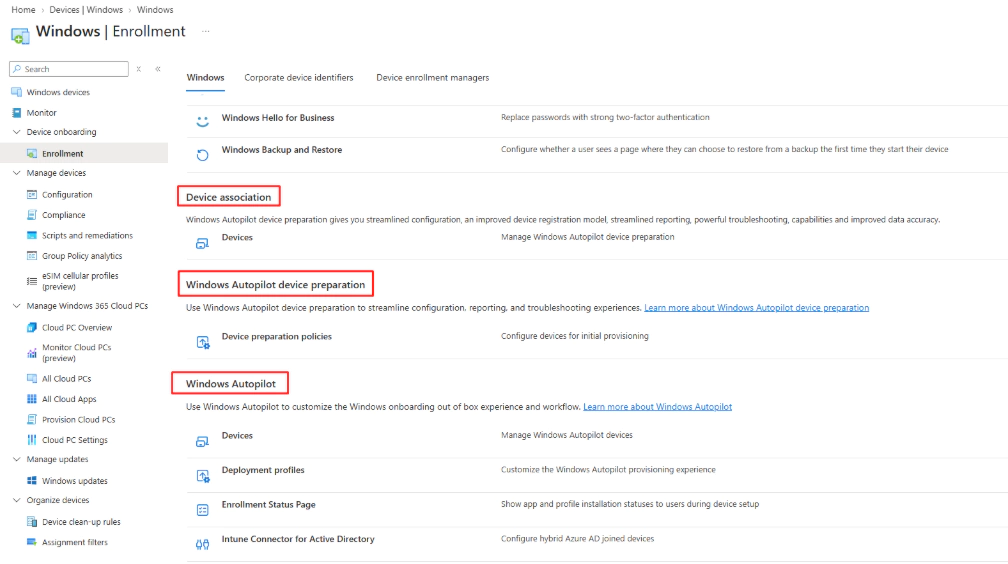
If you’ve opened Intune recently and gone to Devices > Enrollment, you’ve probably noticed the list keeps growing. Windows Autopilot, Windows Autopilot device preparation, Device association, Deployment profiles, Enrollment Status Page, the Intune Connector for Active Directory, it’s a lot to look at, and it’s easy to assume each Intune Device Onboarding is its own separate way of setting up a device.
It isn’t. Some of these are provisioning technologies. Others are just pieces that support or control provisioning. Once you separate the two, the whole picture gets a lot simpler, and that’s what this post is really about. We’ll explain the difference between each Intune Device Onboarding technology.
Intune Device Onboarding – The short version
Windows Autopilot Device Preparation only supports Microsoft Entra Join. Traditional Windows Autopilot supports both Microsoft Entra Join and Microsoft Entra Hybrid Join, depending on the scenario. That one sentence answers most of the questions I get asked about this topic, but the details matter, so here’s the breakdown:
| Deployment scenario | Entra Join | Hybrid Entra Join |
Autopilot Device Preparation – user-driven | Yes | No |
|
Autopilot user-driven | Yes | Yes |
Autopilot pre-provisioned | Yes | Yes |
Autopilot self-deploying | Yes | No |
Autopilot existing devices | Depends on design | Depends on design |
Autopilot Reset | Supported | Not a Hybrid Join provisioning method |
Three layers, not one big list
The easiest way I’ve found to explain this to other admins is to stop thinking of it as one list of enrollment options and instead split it into three layers that each answer a different question.
Layer 1 – Provisioning: how does the device get configured?
Windows Autopilot, and Windows Autopilot Device Preparation. These are the two actual provisioning technologies.
Layer 2 – Deployment scenario: how is the device being deployed?
User-driven, pre-provisioned, self-deploying, existing devices, and Autopilot Reset. This is about the delivery model, not the underlying technology.
Layer 3 – Configuration: what happens during provisioning?
Deployment profiles, device preparation policies, the Enrollment Status Page, applications, configuration profiles, security policies and PowerShell scripts. None of these are provisioning methods on their own – they’re the settings that shape what happens inside whichever method you picked.
Windows Autopilot Device Preparation
Device Preparation is Microsoft’s newer and considerably simpler approach to provisioning Windows. The whole point of it is to strip out a lot of the configuration overhead that traditional Autopilot carries.
The trade-off is identity support. Device Preparation only works with Microsoft Entra Join – there’s no path to Microsoft Entra Hybrid Join here, full stop.
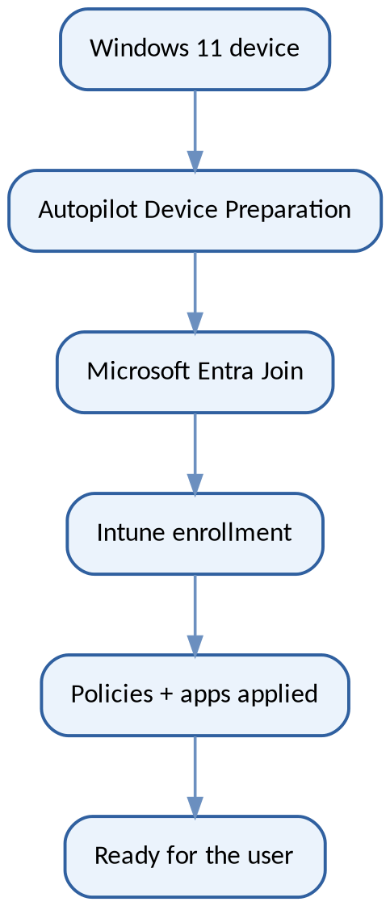
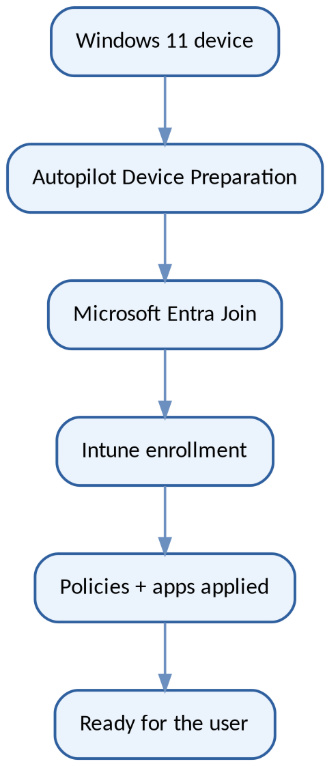
Device Preparation is a straight line: the device joins Entra ID, enrolls in Intune, and picks up its policies and apps.
It’s also built to be cloud-native from the ground up. There’s no dependency on an on-premises Active Directory domain join anywhere in the process, which is exactly why it’s getting so much attention from organizations that are trying to get away from on-prem infrastructure altogether.
Traditional Windows Autopilot
Traditional Autopilot is the older, more mature option, and it still covers far more ground: user-driven, pre-provisioned, self-deploying, existing devices, and Autopilot Reset all live here. Its real strength is flexibility – and in particular, it’s still the only route to Microsoft Entra Hybrid Join, for organizations that genuinely still depend on on-premises AD.
User-driven: one device, one user
This is the scenario most people picture when they think ‘Autopilot’. A device gets assigned to a person, and that person does the sign-in themselves.
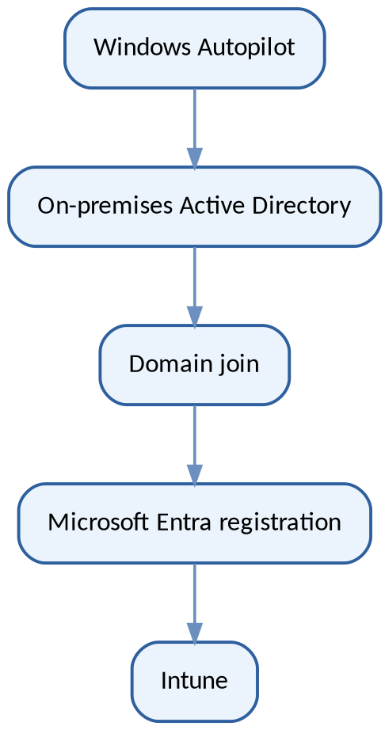
The Hybrid Entra Join variant of user-driven Autopilot: the device still has to touch on-premises AD before it shows up in Intune.
Use user-driven Autopilot when the device belongs to one primary employee, that employee is going to receive it directly, you want a genuinely zero-touch experience, or you specifically need something only traditional Autopilot offers – like Hybrid Entra Join.
Don’t reach for Hybrid Entra Join just because your organization still runs Active Directory somewhere. Use it because there’s an actual technical dependency that requires the domain join. For anything new and cloud-native, Microsoft’s own guidance is to default to Microsoft Entra Join wherever you can.
Pre-provisioned
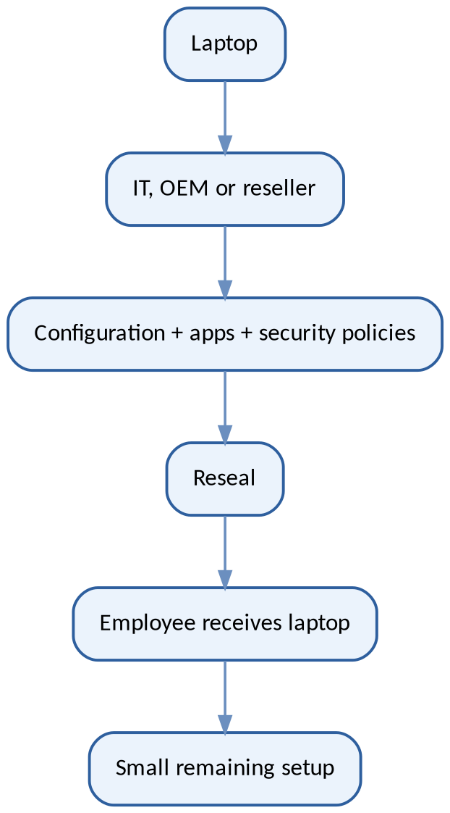
This lets IT, an OEM, or a reseller do the heavy lifting before the device ever reaches the employee – applications, security policies, the works – then reseal it so the end user only sees a light remaining setup step. Traditional Autopilot’s pre-provisioned flow supports both Entra Join and Hybrid Entra Join.
Self-deploying
Built for devices that don’t belong to any one person – think kiosks, shared PCs, digital signage, factory-floor terminals, reception desks. There’s no Hybrid Entra Join option here; self-deploying is Entra Join only.
Existing devices
Useful if you’ve already got a fleet of Windows PCs and want to bring them into a modern Autopilot process rather than replacing them outright. A common pattern in larger environments is to use Configuration Manager to lay down a clean Windows image first, and then hand the device over to Autopilot.
Autopilot Reset
This one’s a bit different – it’s really a reuse operation rather than an initial provisioning method. It strips out user-specific state while keeping the organizational configuration intact, which makes it a good fit for offboarding, reassigning devices, or resetting shared and training machines between users.
Device Association – the important addition in August 2026
Windows Autopilot Device Association is a capability that lives inside Windows Autopilot Device Preparation. It isn’t a third provisioning method sitting alongside Autopilot and Device Preparation – it’s a feature of the second one.
Device Association lets a physical Windows 11 device get tied to your tenant before it ever enrolls with an MDM provider like Intune. It relies on TPM-backed verification, and once complete, it establishes tenant affinity directly on the physical device.
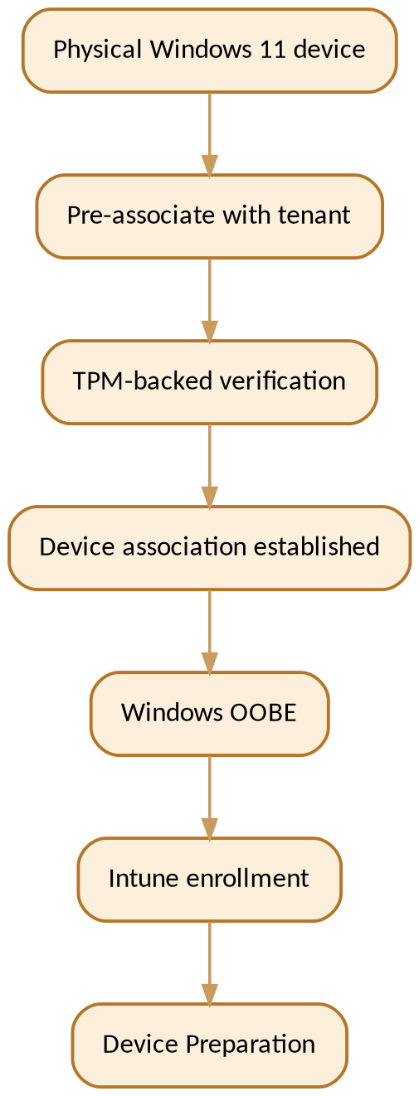
The device proves who it is via TPM before OOBE even finishes, then flows through Intune enrollment and Device Preparation as normal.
Why it’s worth caring about
Device Association means you can establish a relationship with a specific physical device before it ever enrolls – which opens up a few things that weren’t easy to do before:
- Bind the physical device to the tenant ahead of enrollment
- Verify device identity using TPM, rather than relying purely on registration records
- Automatically mark associated devices as corporate-owned
- Target Device Preparation configuration at a specific device rather than a broader group
- Apply extra OOBE customization – language and region, keyboard layout, privacy choices
- Use device naming templates as part of the preparation experience
How the lifecycle actually works
There are three stages to it. First, pre-association – an admin declares that a given physical device should belong to the tenant. Second, association itself – during OOBE the device proves its identity through TPM-backed verification and the association is finalized. Third, enrollment – from there the device just proceeds through Device Preparation and into Intune like any other.
How it compares to traditional Autopilot registration
Traditional Autopilot | Device Association | |
Technology | Windows Autopilot | Autopilot Device Preparation |
Primary purpose | Register device for Autopilot deployment | Bind physical device to tenant |
Identity mechanism | Autopilot device registration | TPM-backed device identity |
UEFI tenant-affinity marker | No | Yes |
Before MDM enrollment | Registration exists | Association is established |
Corporate ownership | Based on the Autopilot / enrollment model | Automatic for associated devices |
Device-targeted preparation | Different targeting model | Designed specifically for associated devices |
Does it support Hybrid Entra Join?
No. Device Association is part of Device Preparation, and Device Preparation is Entra Join only – so that limitation carries straight through to Device Association as well.
If you actually need Hybrid Entra Join
Go with traditional Windows Autopilot. Both the user-driven and pre-provisioned scenarios there support Entra Join and Hybrid Entra Join. For the Hybrid piece specifically, you’ll be relying on the Intune Connector for Active Directory to handle the on-premises domain join. Treat Hybrid Join as something you reach for because a requirement demands it, not as the default for new devices.
What Deployment Profiles, ESP and the Intune Connector actually are
Worth saying plainly: not everything under Windows enrollment in Intune is a provisioning method.
- Deployment Profile – controls how traditional Autopilot behaves during OOBE: deployment mode, join type, user experience
- Enrollment Status Page (ESP) – gates whether the user can reach the desktop before required apps and configuration finish installing
- Intune Connector for Active Directory – the bridge between Intune/Autopilot and on-premises AD, needed specifically for Hybrid Entra Join
Device Preparation vs. traditional Autopilot, side by side
Capability | Device Preparation | Traditional Autopilot |
Microsoft Entra Join | Yes | Yes |
Microsoft Entra Hybrid Join | No | Yes |
User-driven | Yes | Yes |
Pre-provisioned | No | Yes |
Self-deploying | No | Yes |
Existing devices | No | Yes |
Autopilot Reset | No | Yes |
Device Association | Yes – optional | No |
Windows 11 | Yes | Yes |
Windows 10 | No | Yes |
Configuration overhead | Simpler | More configuration |
OOBE customization | Limited, still evolving | Extensive |
A practical decision guide
If your requirement is… | Go with… |
A new cloud-native Windows 11 employee laptop | Device Preparation – user-driven |
A new laptop with IT/OEM pre-staging | Traditional Autopilot – pre-provisioned |
A shared PC or kiosk | Traditional Autopilot – self-deploying, Entra Join |
Rebuilding an existing SCCM/Configuration Manager device | Traditional Autopilot – existing devices |
Reusing an existing Autopilot device | Autopilot Reset |
Windows 365 automatic provisioning | Device Preparation – automatic |
A genuine on-premises AD dependency | Traditional Autopilot – user-driven or pre-provisioned, Hybrid Entra Join |
Device association before enrollment | Device Preparation + Device Association |
Extensive traditional Autopilot customization | Traditional Windows Autopilot |
The simplest way to decide
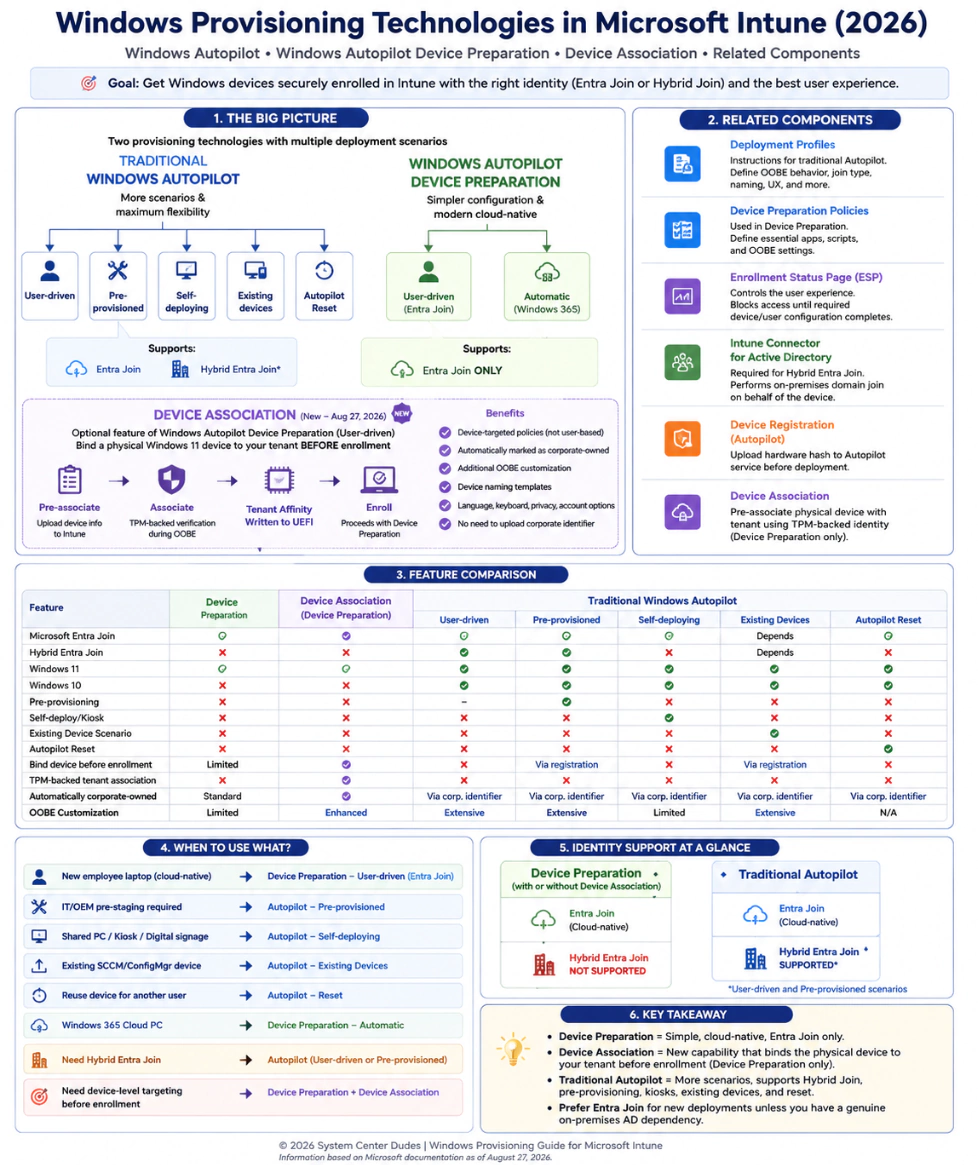
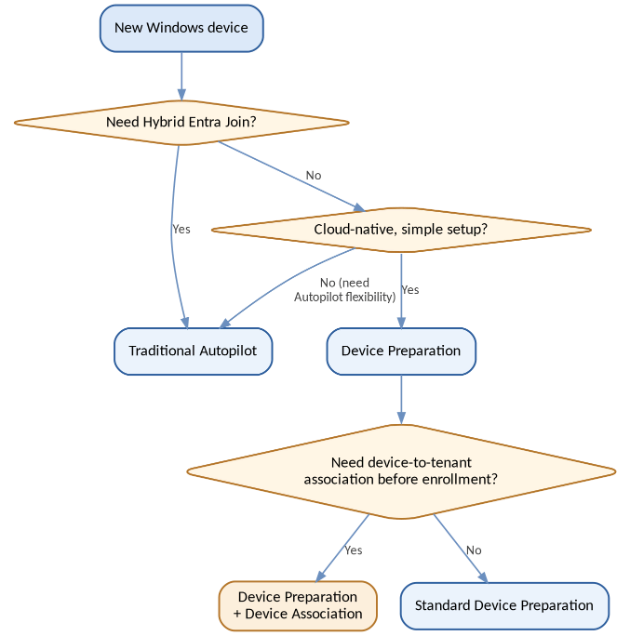
If you want one diagram to keep on hand for this decision, it’s this one:
Don’t mix up Hybrid Join with co-management
These two get confused constantly, and they’re answering completely different questions. Hybrid Entra Join is about identity – what join state does the device have? Co-management is about who’s actually managing it – Configuration Manager, Intune, or both together.
For example, a device can be Hybrid Entra Joined and managed by Configuration Manager and Intune together, or it can be Microsoft Entra Joined and managed by Intune alone. Neither pairing tells you anything about the other by default.
The cheat sheet
Your requirement | Choose |
New cloud-native Windows 11 laptop | Device Preparation – user-driven |
Simple Entra Join deployment | Device Preparation |
Need Hybrid Entra Join | Traditional Autopilot |
Need technician/OEM pre-staging | Autopilot pre-provisioned |
Kiosk/shared PC | Autopilot self-deploying |
Existing SCCM/Windows device rebuild | Autopilot existing devices |
Reuse existing Autopilot device | Autopilot Reset |
Windows 365 automatic provisioning | Device Preparation – automatic |
Device-to-tenant binding before enrollment | Device Association |
Extensive Autopilot/OOBE customization | Traditional Autopilot |
Wrapping up Intune Device Onboarding
Windows provisioning in Intune is moving fast, and it’s tempting to treat every entry in that enrollment list as its own separate method. It’s more useful to keep the three layers apart – provisioning technology, deployment scenario, and configuration – and let that structure do the work for you.
Traditional Autopilot still wins on flexibility, including Hybrid Entra Join. Device Preparation wins on simplicity for cloud-native Windows 11 deployments with Entra Join. Device Association sits on top of Device Preparation as an optional layer that ties a physical device to your tenant before it ever enrolls.
For anything new, I’d default to Microsoft Entra Join and cloud-native management wherever the business lets you, and only bring in Hybrid Entra Join when there’s a real, documented reason for it.
Intune Device Onboarding – Further reading
Share
Get the latest insights and exclusive content delivered to your inbox


Only authorized users can leave comments
Log In